EmDash 1.4 vs WordPress (2026): Features, SEO & Migration
>Compare EmDash 1.4 and WordPress on features, SEO, plugins, hosting and migration. See what changed and decide whether to switch or stay.
🎧 Listen — ~19 min
Audio summary not available yet

Last reviewed November 6, 2026: EmDash has advanced from its September 1.0 launch to version 1.4, released October 29. The latest release focuses on safer editing and operational polish: it protects edits when leaving the editor, detects conflicting saves, improves the editor, lets teams hide unused admin sections, and adds an optional AI Search plugin. EmDash is still not a drop-in WordPress replacement: WordPress themes and PHP plugins do not run in EmDash, and migration means rebuilding presentation and checking what the importer actually preserves.
The real story is architectural: EmDash is betting that content should live beside an Astro application, extensions should receive limited permissions, and people and AI agents should be able to work with the same content APIs. WordPress still wins on its enormous installed base, hosting choice, contributor community, themes, and plugin breadth. EmDash is the more interesting starting point when you already want Astro, TypeScript, Cloudflare—or a CMS designed for a developer-led and agent-assisted workflow.
Bottom line: EmDash 1.4 is a more mature WordPress alternative for developer-led Astro sites, but its latest improvements are refinements rather than a new theme or plugin ecosystem. For an existing, profitable WordPress site, migrate only when the product or operational benefits justify rebuilding and validating the whole publishing stack.

Visual: original AI-generated editorial artwork for this article; it is a concept illustration, not a screenshot or product image.
What changed with EmDash 1.0?
EmDash first appeared as an early beta in April 2026. On September 28, 2026, its team announced 1.0 as a stable, free and open-source CMS built on Astro. The project is written in TypeScript and licensed under MIT. EmDash can run on Cloudflare Workers or on a Node.js server; the project’s own EmDash 1.0 announcement and documentation are the source of truth for current behavior.
The familiar CMS jobs are there: collections and fields, drafts, publishing, rich text, media, taxonomies, menus, previews and plugins. The unusual part is where EmDash draws the boundary. It is not a separate hosted admin service that happens to feed a site: the CMS runs as part of an Astro application, and Astro pages query its content when they render. A published edit can appear on the next request for a server-rendered page; a prerendered page still needs a rebuild.
That architecture trades WordPress’s broadly reusable, host-independent application for a tighter relationship between the content model, the site’s code, and its deployment. That is a deliberate design choice, not a universal upgrade.

Courtesy: EmDash’s official 1.0 announcement. Viewport screenshot captured with Trawl on September 30, 2026; the source page is the authority for release details.

Courtesy: EmDash official site. Viewport screenshot captured with Trawl on September 30, 2026. The editor is shown inside the project’s own product page.
EmDash 1.4 vs WordPress: what changed after launch?
The “EmDash vs WordPress” comparison changed quickly after 1.0. Four releases followed in October. EmDash has improved editorial reliability and migration tooling, but it has not matched WordPress’s decades-old theme and plugin catalogue.
| Release | What shipped | What it changes for a team choosing a CMS |
|---|---|---|
| 1.1 — October 2 | Publishing calendar; richer Portable Text with isolated HTML/CSS/JavaScript and iframe blocks; improved image editing; Microsoft Entra sign-in; experimental browser-agent search; reliability fixes. | Better scheduling and richer editorial pages. Treat browser-agent search as experimental, and review the isolation/CSP requirements before publishing custom blocks. |
| 1.2 — October 7 | Redesigned editor; video blocks; numbered pages for long admin collections; guided domain moves; npx upgrade-emdash@latest; Cloudflare Worker reliability improvements. | More practical for editors and larger libraries. Domain moves can update generated canonical, sitemap, robots and social-image URLs, but still verify redirects and Search Console after a migration. |
| 1.3 — October 15 | Readable revision diffs with author attribution; improved on-page editing; an SEO preference asking AI crawlers not to train on site content; faster Cloudflare D1 paths; contributor-owned drafts; more complete WordPress imports. | Reduces several workflow and migration drawbacks. It does not automatically preserve every plugin, theme, URL, custom field or SEO signal; map and test those before switching. |
| 1.4 — October 29 | Protects unsaved editor changes, detects conflicting saves, improves block spacing and scheduling, adds controls to hide unused admin areas, and refines database, cache and plugin behavior. The official release also introduces AI Search as an optional plugin, not a built-in core feature. No database migration is required for this release. | Improves day-to-day editorial reliability. AI Search requires a separate setup and indexing choices; test cache behavior and plugin compatibility for your own deployment. The release does not close the theme/plugin migration gap. |
These are release-note capabilities, not a promise that every feature works identically in every custom deployment. EmDash 1.1 calls its WebMCP browser-agent search experimental. EmDash 1.4 reports no database migration for that release; operators should still follow the current upgrade guide, back up, build and verify their own site.
Decision update: If you evaluated EmDash in September, reassess it on 1.4 rather than relying on the 1.0 launch feature set. For a new Astro build, it is a more credible candidate, especially if you value safer editing and can operate the app. For an established WordPress site, do a staging import and compare editor workflow, plugin replacements, URL preservation, accessibility, costs and rollback—not just the admin interface.
EmDash vs WordPress: what is actually different?
| Decision | EmDash 1.4 | WordPress | Why it matters |
|---|---|---|---|
| Core approach | TypeScript CMS integrated into an Astro application | PHP publishing platform with a large theme/plugin ecosystem | EmDash expects a developer-owned Astro frontend; WordPress can be operated with far less custom frontend code. |
| Editing | Admin-generated forms for defined collections and fields | Block Editor, posts/pages, themes and plugins | Both can publish; their editing models and extension ecosystems are not interchangeable. |
| Frontend | Astro components define the public HTML | A WordPress theme, a custom frontend, or a headless setup | EmDash is not a visual page builder or an automatic port of a WordPress theme. |
| Plugins | Sandboxed format with declared capabilities when a sandbox runner is configured; native plugins remain trusted code | Plugins extend WordPress and commonly run within the application’s PHP trust boundary | EmDash makes permissions visible and can isolate compatible extensions, but “sandboxed” is not a blanket guarantee. |
| Deployment | Cloudflare Workers or Node.js; database and media depend on the adapter | Many shared hosts, managed WordPress services, VPSs and self-hosted setups | EmDash offers runtime choices, but it is newer and its Cloudflare path is especially integrated. |
| Agent access | EmDash advertises an MCP server; docs publish agent skills and APIs | The REST API is mature and supports the Block Editor and external applications | Agent access is a meaningful design goal for EmDash, not a feature WordPress lacks entirely. |
| Migration | Imports WordPress WXR exports and can connect through an EmDash Exporter plugin | Existing content and workflows remain where they are | Data import does not port PHP themes, plugins, or every operational convention. |

Architecture sketch based on the projects’ published documentation; simplified for comparison, not a deployment blueprint.
WordPress is open-source software under GPLv2 or later, and its official project describes publishing as its central mission. Its REST API provides structured access to posts, pages, taxonomies and other content; it is also part of the Block Editor’s foundation. EmDash’s pitch is not “WordPress has no API” or “WordPress cannot work with agents.” It is that a TypeScript/Astro CMS can make the developer and agent workflow more coherent by default.

Courtesy: WordPress.org About page. Viewport screenshot captured September 30, 2026. It illustrates WordPress’s public project and publishing mission—not its private admin interface.
The strongest EmDash argument: plugin permissions
The most substantial technical idea in EmDash is its sandboxed plugin format. In the intended model, a plugin declares the capabilities it needs—such as reading content or making network requests to an approved host. The site operator sees those permissions and approves them. The sandbox bridge exposes only the declared APIs, and updates that request additional capabilities can trigger fresh consent.
That is a useful improvement to the trust model: an administrator can reason about a plugin’s requested access rather than treating installation as an opaque yes/no event. It also gives an AI agent a clearer tool contract: a capability says what an integration can do, while MCP/API tools describe the actions a client can request.
But this is not magic isolation. EmDash’s security documentation spells out important boundaries:
- A plugin granted
content:writecan modify content broadly; the permission is not necessarily limited to records the plugin created. - Native plugins run in the site process and should be trusted like application code.
- Sandboxed plugins need a working sandbox runner. Without one, they may not load—or an operator may deliberately move a plugin into the in-process trust boundary.
- The Cloudflare Worker Loader sandbox requires a paid Workers plan and configuration. The Node.js runner has different enforcement limits; documentation says some Cloudflare-enforced CPU/subrequest limits are not enforced there.
So the honest claim is “EmDash offers a capability-gated sandbox path,” not “EmDash makes every plugin safe.” Operators still need to review publishers, permissions, dependencies, updates and runtime configuration. This distinction matters more than the phrase “secure plugins” on a launch page.
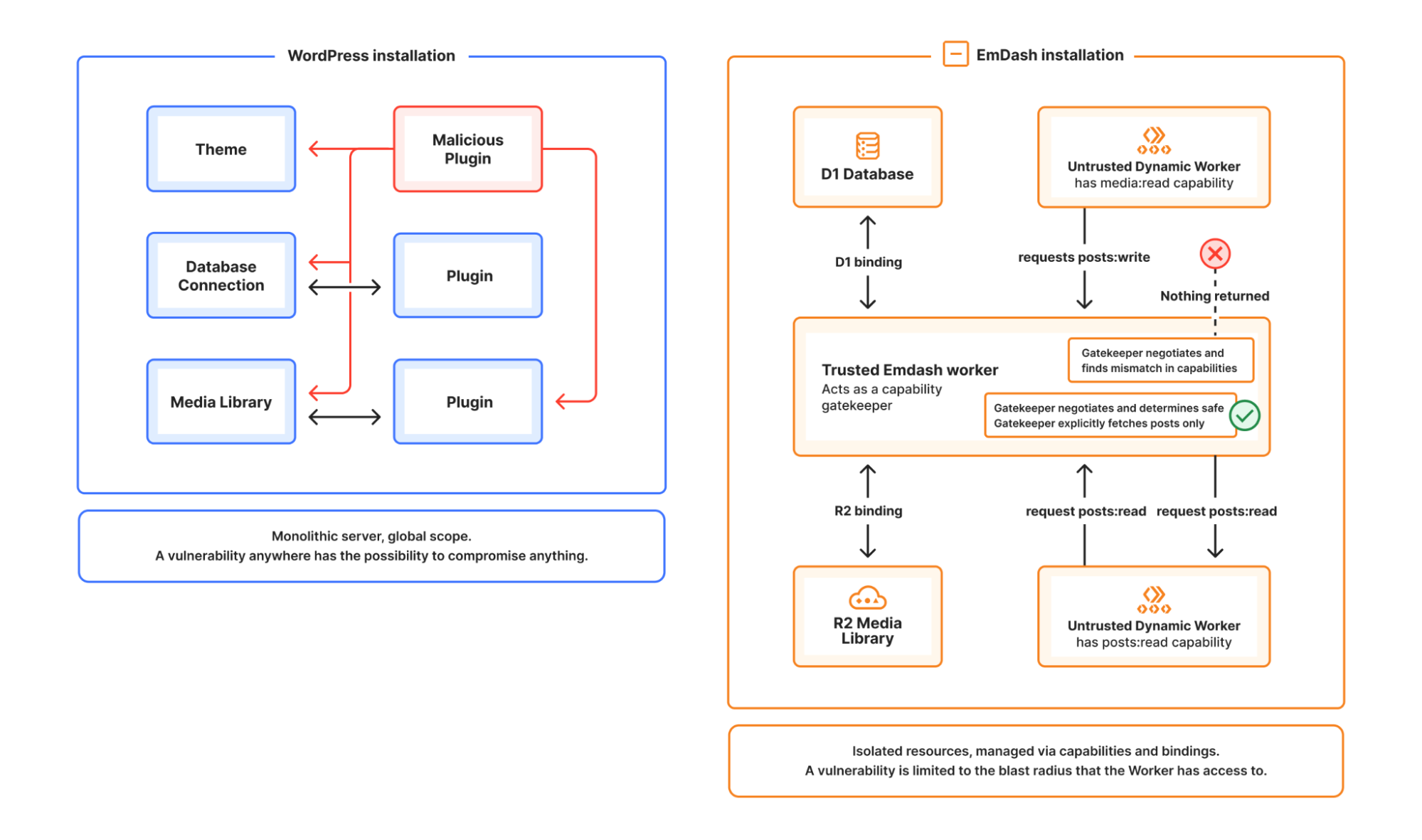
Courtesy: Cloudflare’s EmDash announcement, official plugin-security illustration. The diagram explains the project’s intended model; consult the current capability documentation for implementation limits.
The AI-agent angle: a real advantage, not a replacement for judgment
EmDash puts agent access unusually close to the product. Its homepage describes a built-in MCP server for drafting, editing, searching and scheduling content with team-level permissions. The project also publishes agent skills for building sites, creating plugins, using its CLI, and porting WordPress themes or plugins. The skills can be installed for tools including Codex, Cursor, Claude Code, GitHub Copilot, Gemini CLI and OpenCode.
That makes some development workflows more direct: an agent can read the current schema, draft structured content, or help implement a plugin using project-specific instructions. It does not mean an agent should publish unsupervised, that MCP automatically understands a business’s editorial rules, or that WordPress cannot be automated. WordPress already has a REST API and a mature ecosystem of integrations; teams can connect agents through those interfaces.
If you are designing an agent-assisted publishing stack, compare the client in our coding-agent directory and the models available in the AI model directory; compatibility, tool calling and permission boundaries matter more than a CMS label alone.
The advantage is the default path. EmDash appears to treat human and agent operations as first-class CMS workflows rather than making every AI connection an add-on project. That is promising for small engineering teams, but production teams should still scope tokens, limit write permissions, keep audit trails, require review for publication, and test rollback.
If you are evaluating agent-run development, our guide to improving the harness around a coding agent covers why tools, permissions and feedback loops matter as much as the model. The coding-agent directory can help compare the clients you might connect to an EmDash site.
Cloudflare’s own blog is the proof point—and the caveat
Cloudflare moved its blog to EmDash on August 12, 2026, before the 1.0 release. In its migration write-up, Cloudflare described the work as a production test of publishing flows, scale, localization, SEO, editor usability, caching and rollout safety—not just a launch-day demo.
Cloudflare reported a normal traffic neighborhood of about 75 requests per second, with spikes above 5,000 RPS. Its test plan included ramp, breakpoint and a simulated 7,000-RPS burst. The published production setup combined an EmDash Worker with Workers Cache, an EmDash object cache on Workers KV, and Hyperdrive connected to PlanetScale. Cloudflare reported serving 99.5% of static files and 70% of requests from cache in that setup, and later said the site handled 28 posts over nine days and close to three million pageviews during Agents Week. It also reported a 28,000-RPS DDoS event absorbed by Cloudflare protection.
Those numbers deserve attention—but context matters. They are Cloudflare’s figures for Cloudflare’s full stack, not a vendor-neutral comparison against an identically configured WordPress site. The post does not establish that every EmDash installation will inherit Cloudflare’s cache design, database placement, traffic profile, staff expertise or DDoS protection. It is evidence that a carefully engineered deployment can work at scale; it is not a universal benchmark or a hosting guarantee.
The most useful part may be what Cloudflare admits it had to fix. The pre-1.0 migration uncovered gaps in media handling, search, bylines, localization, SEO, content-security policies and editor usability. Scheduled posts had a bug until version 0.19.0. The team used a proxy Worker to shift visitors between old and new systems, retained a fallback for server errors, and moved traffic gradually through 1%, 5%, 15% and eventually 100%.
That is a better migration story than “we pressed deploy and everything was faster.” It is a reminder that production CMS work is still about boring details: content correctness, predictable editing, caches, URLs, rollback and people who can respond when something breaks.

Courtesy: Cloudflare Blog migration report, official before-and-after visual. This shows the frontend redesign, not a CMS admin screen or an independent performance test.
Is EmDash better for SEO?
Neither a CMS label nor a faster framework automatically earns rankings. Search performance depends on the pages a site actually serves: helpful content, crawlable links, stable URLs, sensible metadata, mobile usability, rendering, image handling, structured data where applicable, and a sound migration.
Astro gives developers control over HTML and rendering. EmDash can make content queries part of the server-rendered Astro application. Those are useful building blocks, not a promise that an EmDash page outranks a WordPress page. A fast site with broken canonicals, orphaned pages, accidental noindex, missing redirects or empty category pages can still lose organic traffic.
Before migrating a search-driven WordPress site, inventory and test:
- URL parity: preserve high-value slugs when possible; map every changed URL to its closest replacement with a permanent redirect.
- Metadata: verify titles, descriptions, canonical URLs, Open Graph images, robots directives and language alternates on real rendered pages.
- Structured data: port only schemas that still match visible content; validate breadcrumbs, articles, products and organization data after launch.
- Sitemaps and robots: ensure sitemaps contain only canonical, indexable URLs and that important routes are not blocked.
- Media and internal links: check attachment URLs, image alt text, responsive sizes, redirects and links embedded inside imported content.
- Rendering and cache behavior: inspect response HTML and headers, then test logged-in drafts, previews, scheduled posts and cache invalidation.
- Search Console: save a pre-migration baseline for clicks, impressions, queries and landing pages. After release, monitor crawl errors and traffic by old and new URL groups.
EmDash’s current importer can bring in WordPress WXR exports and, with its exporter plugin, additional supported data. The official import guide is unusually specific: a WXR file includes attachment metadata and source URLs, not necessarily the media bytes; keep the old site available until media copying is done. WXR and exporter imports can move posts, pages, taxonomies, authors/bylines and supported reusable blocks. The exporter path can also fetch comments, menus, selected settings and supported SEO values.
Do not assume status behavior is identical. The current importer maps published entries to published and drafts to drafts; pending/private entries also become drafts, while future, trash or other statuses are mapped to drafts. That calls for a human review before importing content into a live publishing workflow.
The WordPress migration trap: data imports; software does not
An export file is not a working website. EmDash can import content, but it does not execute PHP, WordPress themes or WordPress plugins. If your homepage is built with a custom theme, your checkout depends on WooCommerce extensions, or editorial workflows rely on a plugin, you must design and implement equivalent Astro/EmDash behavior—or keep the relevant system in WordPress.
Think of the migration as four separate projects:
- Content: posts, pages, authors, categories, media and supported custom types.
- Presentation: templates, blocks, theme behavior, responsive layout and accessibility.
- Operations: roles, approvals, schedules, forms, email, commerce, analytics and integrations.
- Search continuity: URLs, redirects, metadata, structured data, canonicalization and monitoring.
EmDash’s WordPress import UI can reduce the first project’s manual work. It does not erase the other three. Make a plugin inventory before estimating migration cost: list each plugin, the business function it supports, whether that function is still needed, its replacement, its data exports, and a named owner for acceptance testing.
Hosting and cost: “serverless” is a deployment shape, not a zero-cost promise
On Cloudflare, the intended stack uses Workers and D1, with R2 for media. On Node.js, the current documentation lists SQLite, libSQL or PostgreSQL options, plus filesystem or S3-compatible media storage. That is broader than “Cloudflare only,” but it still means the site operator must own the database, media, backup, upgrade and deployment story.
Cloudflare’s current Workers pricing lists a $5/month minimum for Workers Paid. EmDash’s plugin-sandbox guide says the Dynamic Worker sandbox requires a paid Workers plan and a Worker Loader binding. You can deploy without enabling sandboxed plugins, but then you should understand exactly which plugin formats load and what trust boundary applies. Storage, database reads/writes, observability and optional products also have their own limits or charges.
That may be a great economics story for a spiky, cacheable site already built around Workers. It is not necessarily cheaper than a $10 managed WordPress plan once you count developer time, rebuild work, email, search, forms, image transformations, backup retention and support. Compare total cost of operating the whole site, not the headline price of one compute primitive.
Who should choose which platform?
| Your situation | More sensible first choice | Reason |
|---|---|---|
| A new developer-led site already using Astro and TypeScript | Evaluate EmDash | Its CMS, schema and frontend share one application and deployment. |
| A Cloudflare Workers site with a team able to manage D1/R2, cache and rollbacks | Pilot EmDash | The platform aligns with the runtime; still prove your own workload and plugin setup. |
| A business site whose staff depend on a specific WordPress theme or plugins | Stay on WordPress for now | EmDash imports content, not PHP extension behavior. |
| A high-traffic site with several editors, language variants or custom SEO workflows | Run a representative migration pilot | Cloudflare itself found real edge cases in these areas before launch. |
| A content team that wants a CMS without owning an Astro codebase | Compare managed WordPress and hosted headless CMSs | EmDash is developer-centric and is not a no-code visual builder. |
| An agent-heavy team that needs machine-operable content workflows | Evaluate both APIs; EmDash has a strong default story | Built-in MCP is compelling, but WordPress REST and existing integrations remain viable. |
For developer resource discovery beyond CMSs, explore our developer resources directory. The best platform is the one your editors can use, your team can secure, and your operators can recover—not the one with the loudest launch headline.
A low-risk way to evaluate EmDash 1.4
Do not start by moving the main domain. Take 20 representative pieces of content: an ordinary post, a long article with tables and images, a page built with custom blocks, a translated page, a scheduled post, a private item, and a post with comments and SEO metadata.
Then run this pilot:
- Create an EmDash 1.4 starter and deploy to a staging hostname.
- Import a WXR export or connect the exporter. Inspect schema mappings before importing everything.
- Rebuild one real frontend template in Astro and compare its HTML, mobile rendering and accessibility with the current site.
- Test your essential editor workflow: draft, review, preview, schedule, publish, unpublish and restore.
- Install only one low-risk sandboxed plugin; check its declared capabilities and verify the actual runner is active in the target deployment.
- Test media copies, redirects, canonicals, sitemap output, analytics and caching.
- Load-test a representative page mix, then rehearse rollback to the original site.
Keep WordPress serving production until the staging version passes editorial acceptance, data reconciliation, SEO checks and recovery drills. A CMS migration is successful when users retain their content, editors can still ship safely, search engines see continuity and the team can recover—not when a new admin screen loads.
Verdict: WordPress’s future is competition, not a funeral
EmDash 1.4 is a more polished continuation of the stable CMS launched in September. Its combination of Astro, TypeScript, structured content, agent-facing interfaces and capability-based plugin isolation gives developers a credible alternative architecture to test. The 1.4 release chiefly improves editing reliability and administration; it does not turn EmDash into a drop-in WordPress migration.
Yet WordPress remains difficult to displace where its ecosystem is the product: familiar editing, thousands of specialized integrations, independent hosting, agencies, support and years of operating knowledge. EmDash is not compatible enough to make migration a copy-and-paste exercise, and its strongest differentiators ask teams to accept a developer-centric runtime and deployment model.
So is WordPress nearing its end? No. Is the old assumption that every serious content site should start with WordPress being challenged? Yes. EmDash 1.4 strengthens the case for teams that already want an Astro-, edge- and agent-shaped publishing stack. The next proof will be wider adoption, healthy third-party plugins, smooth upgrades, reliable migration tools and production teams outside Cloudflare choosing it—and staying with it.
Frequently asked questions
Is EmDash 1.4 a WordPress replacement?
It is a more polished alternative for some projects, especially developer-led Astro sites, but it is not a drop-in replacement. WordPress themes and PHP plugins do not run in EmDash, and the frontend must be built or ported.
Is EmDash open source and free?
EmDash is open source under the MIT license. Hosting is separate. Cloudflare’s Workers Paid plan has a $5 monthly minimum, and the Dynamic Worker plugin sandbox requires a paid plan; database, storage and other services may add costs.
Can EmDash import a WordPress site?
Yes. Its importer supports WXR exports and a WordPress exporter plugin for additional supported data. Review mappings first: media may need to be copied separately, unsupported statuses can become drafts, and PHP themes/plugins are not imported as working software.
Does EmDash improve SEO automatically?
No. Astro gives developers control over rendered pages, but rankings depend on content quality, technical implementation and migration hygiene. Preserve URLs, redirects, metadata, canonicals, structured data and sitemap behavior, then monitor Search Console.
Should an existing WordPress site migrate now?
Usually not solely because EmDash reached 1.4. Pilot it on a staging site if its architecture solves a real problem, then compare total operating cost, editor workflow, plugin replacements, SEO continuity and rollback readiness.
Sources and image references
- EmDash 1.0 release announcement — release status, project direction and maintainers.
- EmDash 1.1 release notes — publishing calendar, isolated rich-content blocks, image editing, Entra sign-in and experimental browser-agent search.
- EmDash 1.2 release notes — editor, video, pagination, domain-move and upgrade CLI changes.
- EmDash 1.3 release notes — revision history, inline editing, AI-crawler preference, performance and WordPress-import improvements.
- EmDash 1.4 release notes — editor data-loss fixes, conflict detection, admin controls, refinements and the optional AI Search plugin.
- EmDash documentation: Why EmDash? — runtime model, fit, hosting options and operational trade-offs.
- EmDash WordPress content-import guide — WXR/exporter coverage, media behavior and status mappings.
- EmDash plugin capabilities and security — capability consent and enforcement limits.
- EmDash plugin sandbox deployment guide — Cloudflare and Node.js runner requirements.
- EmDash agent skills — supported project skills and agent installation.
- Cloudflare Blog: The Cloudflare Blog—brought to you by EmDash — first-party migration account, architecture, traffic reports, rollout and gaps.
- Cloudflare’s original EmDash announcement — original plugin architecture explanation and official diagram.
- WordPress.org About and WordPress REST API Handbook — WordPress mission, license and API capabilities.
- Cloudflare Workers pricing — current plan baseline; verify costs before deployment.
Courtesy and visual notes: The EmDash and WordPress page screenshots in this article were captured from their public official pages with Trawl on September 30, 2026. Cloudflare’s plugin diagram and blog-redesign comparison are embedded from official Cloudflare pages with attribution. The architecture SVG was drawn for this article from the cited documentation. The lead illustration is original AI-generated artwork; it is conceptual, not a product screenshot. Interface screenshots may change as the projects ship updates.
Keep reading
Related reading
⚡ AI Engineering Briefing
AI model releases, practical tutorials, developer tools, and engineering research. Unsubscribe anytime.
Comments
Comments are temporarily unavailable while the public discussion space is being configured.