JevGrep: AI Code Search for Coding Agents (Review & Setup)
>JevGrep review: CLI setup, agent support, source-code privacy, and what its 8/10 evaluation shows—including the 0.5.0 cost caveat.
🎧 Listen — ~11 min
Audio summary not available yet
When you join an unfamiliar codebase, the first hard part is often not writing code. It is finding where the behavior lives. You may know that a session expires too early, a retry happens twice, or a telemetry event is missing—but not which module, configuration file, or test owns it.
JevGrep is a command-line retrieval tool for that discovery step. Ask a repository question in plain English; its jg command returns likely files, reading leads, and selected source excerpts with line references. A coding agent can then inspect the exact code and make the change using its normal tools.
Short verdict: JevGrep is worth evaluating when an agent repeatedly spends context and tool calls locating behavior across an unfamiliar repository. It is not a replacement for rg, code review, tests, or the coding agent. Search sends eligible repository excerpts to Jev through the provider selected in jg auth, so treat the benchmark and source-sharing boundary as part of the product decision.
Courtesy: official JevGrep project artwork from the repository assets. The illustration is conceptual, not a literal terminal screenshot.
JevGrep at a glance
| Question | Answer |
|---|---|
| What is it? | A semantic source-retrieval CLI for coding-agent workflows |
| Command | jg |
| What comes back? | Relevant file locations, reading leads, and verbatim source excerpts with line references |
| Does it implement the code change? | No. Your coding agent reads the results, edits, and tests the code |
| Runtime requirement | Node.js 22+; macOS, Linux, or Windows |
| Provider requirement | A supported provider key configured with jg auth |
| Providers named in the current README | Vercel AI Gateway, TypeSafe, OpenRouter, OpenCode Zen, or a custom TypeSafe-compatible endpoint |
| Agent setup | jg skill installs the bundled skill for detected coding agents, including Codex, Claude Code, and OpenCode |
| License | MIT, according to the public repository |
These details reflect the official README reviewed on November 6, 2026. The package, provider list, benchmark notes, and installer behavior can change; verify the official repository before installation.
What problem does JevGrep solve?
Traditional text search is excellent when you know a symbol, filename, or exact phrase. But questions like “where do we decide whether an account is trusted?” or “which tests cover retry behavior after a timeout?” describe behavior, not necessarily the names used in code.
JevGrep tries to bridge that gap. The project describes a retrieval flow that explores repository structure, uses content previews to select promising files, then examines useful source units and surrounding context. Its output is intended to give the agent a grounded starting point—not a generated answer or a guarantee that every relevant file has been found.
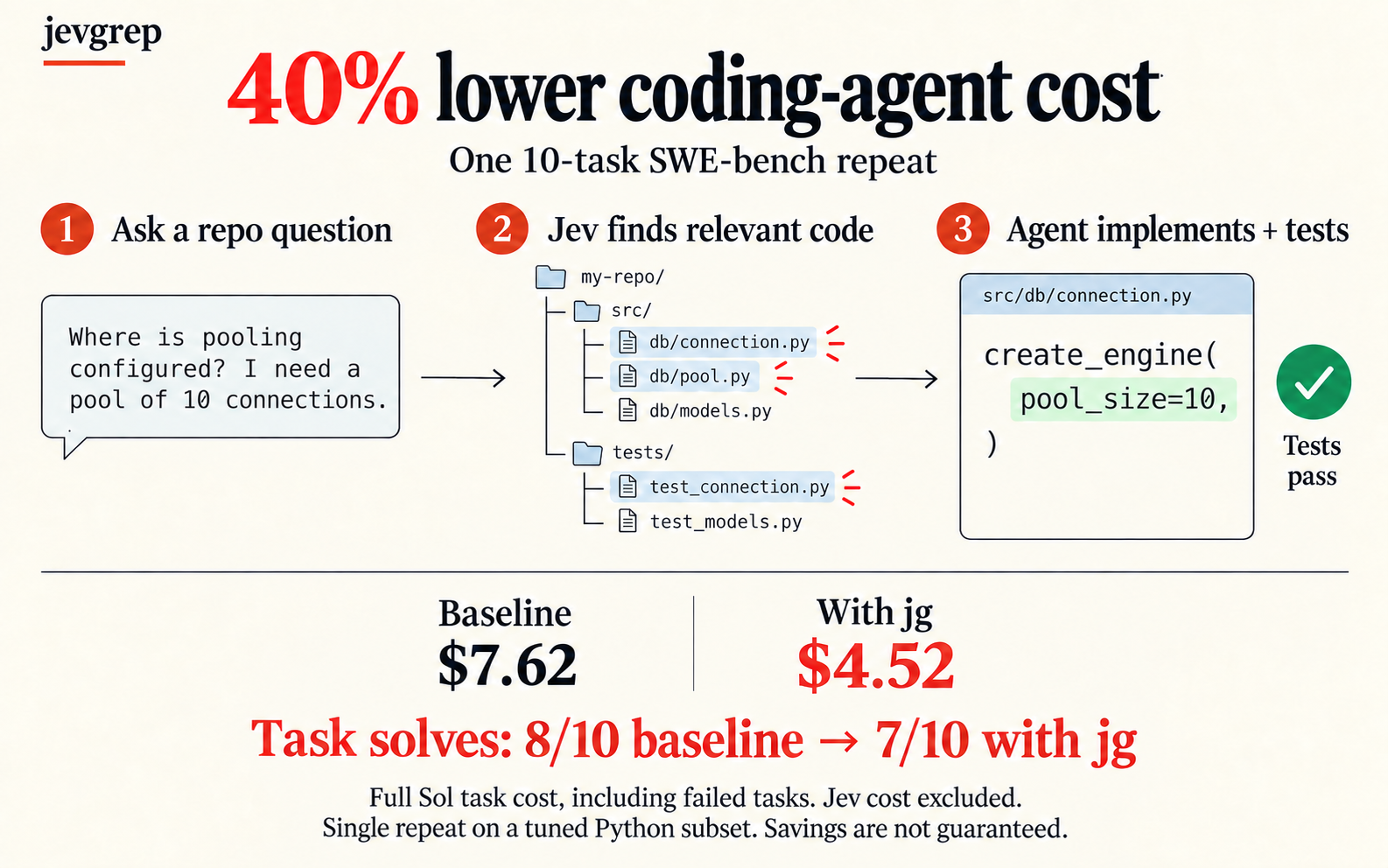
Courtesy: official JevGrep workflow graphic. Follow the linked repository for the current implementation and benchmark disclosures.
The important distinction is retrieval versus reasoning. JevGrep helps locate evidence. The agent still needs to read enough surrounding code, understand call paths, choose a safe implementation, and run relevant tests. A plausible excerpt is a lead, not proof that the full system has been understood.
A practical workflow
The project’s README documents a short setup: install the CLI, authenticate, then ask a behavior-focused question from the repository. The examples below follow that documented interface.
1npm install -g @dzhng/jevgrep
2jg auth
3jg doctor
4
5cd path/to/project
6jg "Where is authentication checked before a request reaches a handler?" .
Other useful query shapes include:
1jg "How are database connections created, pooled, and closed?" ./src
2jg "Which tests cover retry behavior when a request times out?" .
Ask about behavior and relationships rather than simply repeating a keyword. “Where is the user role validated before an export starts?” gives the retrieval system a behavioral target. If you already know the exact function or string, use rg or your IDE’s search first; those tools are simpler and deterministic for exact matches.
Install the agent skill when you want automatic use
Installing a CLI does not by itself teach an agent when it should call it. The current README recommends the bundled installer, which detects supported coding agents and installs the skill from the repository:
1jg skillUse jg skill --global for a user-wide install or jg skill --yes for an unattended install. The skill teaches the agent when behavioral retrieval is useful; it does not configure provider credentials. The installer needs Node.js 22.20+, npm/npx, and network access. Re-run jg skill to refresh the skill independently of the npm package. The project says provider selection requires CLI 0.3.0 or newer; upgrade with npm install --global @dzhng/jevgrep@latest because there is no jg upgrade command.
For a broader view of coding-agent choices, see the coding agents directory. JevGrep is a retrieval helper that can sit alongside an agent—not an agent IDE or autonomous software engineer in its own right.
What the output is—and is not
JevGrep’s documented result can contain:
- a short summary of the search;
- relevant file locations;
- reading leads for where to continue;
- selected source excerpts and line references;
- coverage and incomplete-result information where available.
The README notes declaration parsing for Python, TypeScript/JavaScript, Go, and Rust, including shebang detection for extensionless Python and Node scripts; other text uses a fallback. It also says qualifying file locations can remain in the result even when the system cannot confidently return an excerpt. This is a useful design choice: “no excerpt returned” should not silently become “no relevant code exists.”
Before searching a broad repository, use jg files [root] to inspect the eligible file and byte counts grouped by top-level directory. It makes no provider request and does not read source, so treat its counts as an upper bound—not as an upload estimate or a privacy audit. Use --exclude with root-relative gitignore patterns to narrow a search, and remember that excluding tests can remove useful regression context.
Still, verify the returned files. Search tools can miss indirect call sites, generated behavior, framework conventions, and tests whose wording differs from the implementation. After retrieval, inspect callers and nearby tests, then run the project’s normal checks. That keeps JevGrep in its right role: a navigation accelerator, not an authority on correctness.
The benchmark: separate the cost claim from the quality evidence
The current README reports that a frozen JevGrep package and its public skill solved 8 of 10 tuned Python SWE-bench tasks, matching a saved no-Jev baseline. Coding-agent (Sol) cost was $5.44 versus $7.62, a measured 28.6% reduction; this headline excludes Jev’s retrieval cost. It measures task outcomes and spend—not a speedup.
A later total-cost rerun of package 0.4.3 also retained 8/10 solves and measured 25.8% lower combined Sol-plus-Jev cost ($5.66 versus $7.62). The README’s 0.5.0 evaluation retained 8/10, cut native Jev cost by about 59% versus that 0.4.3 run, but put combined Sol-plus-Jev cost 2–3% higher. These are distinct single-run cohorts, not repeated trials that prove equivalence or a universal saving. The project explicitly says the sample does not establish causal effect, remove sampling variance, or generalize to arbitrary languages, repositories, or agents.
| Published comparison | Sol cost | Jev cost included? | Solves | What it supports |
|---|---|---|---|---|
| Frozen package and skill cohort | $5.44 vs $7.62 baseline | No | 8/10 vs 8/10 | Lower coding-agent cost in this tuned cohort; not total-cost savings |
| 0.4.3 total-cost rerun | $5.66 vs $7.62 baseline | Yes | 8/10 vs 8/10 | 25.8% lower combined cost for this separate run |
| 0.5.0 evaluation | Combined total 2–3% higher than 0.4.3 | Yes | 8/10 | Lower native Jev cost, with a small measured combined-cost increase |
| Later speed-study candidate | Sol cost 29.97% lower than fixed no-Jev baseline | No; Jev API cost is unknown | 8/10 vs 8/10 | 12.70% lower wall time and 41.51% fewer Sol tokens in that separate ten-task cohort; not a total-cost result |
Read the frozen cohort’s methods and limits, the 0.4.3 total-cost report, the 0.5.0 evaluation records, and the later speed-study report. The speed study is a distinct cohort: its Sol-only cost excludes Jev’s native API cost, which the report says is unknown, not zero. For your own team, compare paired representative tasks and count both coding-agent and retrieval-provider costs, misses, latency, and successful fixes.
Privacy and source-code handling
This is the most important operational question before trying it on private code. Searches send eligible source content to Jev through the provider selected during jg auth, together with the question and repository-relative source context. The current README says default filtering respects ignore rules and excludes hidden paths, dependency/build output, binaries, .env variants, and obvious credential files. It also applies best-effort credential-pattern checks to source text; UUID-shaped identifiers are excluded from its entropy signal. These checks are not secret redaction or a guarantee that every sensitive value is removed.
Before your first live search:
- Choose a repository and directory scope that you are permitted to send to the configured provider.
- Review ignore rules and add project-specific exclusions for sensitive files or generated data.
- Do not treat credential-pattern filtering as a substitute for a security review.
- Check your organization’s AI-provider retention and data-processing terms.
- Keep the authorization and provider configuration scoped to the repositories you intend to search.
The README says provider credentials are stored in an owner-only configuration file, are not included in search payloads or results, and that results are cached locally by default. Treat all eligible source excerpts as leaving the machine for remote evaluation. Review the selected provider’s retention terms, check the exact root with jg files, narrow it with exclusions, and do not use --include-sensitive unless your policy explicitly permits it.
JevGrep vs rg vs IDE search
| Tool | Best when | Strength | Trade-off |
|---|---|---|---|
rg | You know an identifier, literal, or pattern | Fast, exact, local, scriptable | Does not infer behavioral similarity |
| IDE search/navigation | You are already exploring a project interactively | Convenient symbol and reference navigation | Depends on indexing and what you know to search for |
| JevGrep | You can describe behavior but not its location | Natural-language retrieval across repository structure | Remote evaluation, probabilistic ranking, and another provider dependency |
| Coding-agent built-in search | The task is small or the agent already has good repository context | No separate setup; keeps the normal workflow | Can spend extra context/tool calls exploring unfamiliar code |
These approaches work best together. A good sequence is: use JevGrep to discover likely areas, rg or IDE navigation to verify exact symbols and callers, then ask the coding agent to implement and test. Avoid spending a semantic-search request on a one-file exact lookup.
For a different editor workflow—AI inline completions that suggest code as you type rather than retrieve repository context—see our VS Code autocomplete extensions comparison.
Who should try JevGrep?
Likely a good fit: developers and teams using coding agents on repositories they do not know well, especially when behavior crosses implementation, configuration, and tests. It may also help when repeated broad exploration is consuming agent context.
Think twice: regulated or confidential repositories that cannot send source to a remote provider; tasks where missing a file carries high risk; and projects where direct search already identifies the relevant path quickly. For those cases, local search and manually controlled agent context may be preferable.
Do not adopt based only on the cost chart. Run a small, representative pilot. Record the task, files found, files missed, agent outcome, total model and retrieval cost, and whether any source was sent outside your approved boundary. Preserve the baseline; compare paired tasks rather than selecting whichever run looks better.
Final take
JevGrep’s idea is practical: let a coding agent ask where behavior lives, then return source evidence rather than another prose-only answer. The CLI and optional skill make it approachable, and the project’s candid benchmark disclosure is more useful than a savings claim without its solve rate.
The right expectation is “help my agent get oriented”, not “guarantee the right files” or “make coding agents 30% cheaper.” Try it where semantic discovery is genuinely the bottleneck, review the remote-source boundary first, and judge it on your own completed tasks.
If you are improving the surrounding workflow, read our guide to building a better AI agent harness and browse the AI model directory for model options used by coding tools.
Frequently asked questions
Is JevGrep a coding agent?
No. It is a retrieval CLI that returns likely source locations and excerpts. A separate coding agent or developer uses that context to make and verify changes.
Does JevGrep work with Codex and Claude Code?
The current bundled installer detects supported agents, including Codex, Claude Code, and OpenCode. Run jg skill; use jg skill --global for user-wide installation. You can still use the CLI directly without an agent skill.
Does JevGrep run on Windows?
Yes. The current README lists macOS, Linux, and Windows with Node.js 22 or newer. Check the linked project instructions for current installer and shell requirements before setup.
Does JevGrep send my source code to the cloud?
Its README says eligible source excerpts are sent to Jev through the provider selected with jg auth. Filtering is best effort, not guaranteed redaction. Review the search root and the provider’s data policy before use.
Does it replace rg?
No. Use rg when you know an exact string, path, or symbol. JevGrep is for describing behavior when the location is unknown.
Does the benchmark prove JevGrep saves 30%?
No. The 28.6% figure is Sol-only cost for one ten-task tuned Python cohort that matched its saved baseline at 8/10; it excludes Jev cost. A separate 0.4.3 rerun measured 25.8% lower total cost, while the 0.5.0 README reports combined cost 2–3% higher than that run. A later speed study reports lower Sol cost and wall time against a fixed baseline, but Jev API cost is unknown there. These are separate single-run results, not universal guarantees or proof of total savings.
Research note: product behavior, supported systems and providers, setup, privacy, and benchmark caveats were checked against the official JevGrep README, the 0.4.3 total-cost report, the frozen 8/10 cohort and methodology, and the speed-study report on November 6, 2026. Benchmark details and package commands can change, so verify the linked repository before adopting.
Keep reading
Related reading
⚡ AI Engineering Briefing
AI model releases, practical tutorials, developer tools, and engineering research. Unsubscribe anytime.
Comments
Comments are temporarily unavailable while the public discussion space is being configured.