OpenAI’s September 2026 Updates: Dots, GPT-6.1 Sol and the New Agent Stack
>Explore OpenAI’s September 2026 updates: Dots, ChatGPT Space, GPT-6.1 Sol, Astra Ultrafast, Codex Cloud, MCP events and practical developer workflows.
🎧 Listen — ~15 min
Audio summary not available yet
OpenAI’s September developer updates point toward a larger change in how people use AI: persistent agents, shared documents, reusable development environments and integrations that react to events. The useful question is how these pieces fit into work that must actually get finished.
This guide examines the 24 items in the supplied September DevDay roundup, checks their documentation, and explains how a developer or small product team could use them. Official documentation was reviewed on September 30, 2026. Feature documentation establishes product behavior; it does not establish that every feature debuted at the same event. Several features have earlier release histories. Where the exact announcement or access details could not be verified, that limitation is stated in the relevant section.
The practical takeaway: start with a reproducible environment and one measurable workflow. Add persistent agents, collaboration and event triggers when they solve a clear coordination problem. A faster model helps, but your sources, tools, permissions and checks still determine whether the result is usable.
The September roundup at a glance
| Layer | Items covered | What to evaluate first |
|---|---|---|
| Personal and shared work | Dots, Space, Pages, Teams, team automations, messaging integrations, Meetings, profiles | Context quality, ownership and sharing |
| Models and access | GPT-6.1 Sol, Astra Ultrafast, Pro 500, Sign in with ChatGPT | Completion quality, latency and actual usage |
| Software delivery | Cloud environments, CLI updates, Code Review, GitLab, Security Cloud | Reproducible setup and verified changes |
| Application infrastructure | Agents API computer use, Bedrock Managed Agents, Decisions API | Supported contracts and reliable recovery |
| Integration ecosystem | Plugin extensions, submission, MCP events, SDKs, Sites hosting | Useful UI, authenticated events and distribution |
| Enterprise data controls | ZDR with Private Safety Processing | Storage responsibilities and access controls |
For alternative tools and deployment options, explore our coding-agent directory, AI model directory and developer resources.
1. Dots: a persistent agent with its own working environment
A dot is an always-on agent powered by GPT-6 Astra, with a cloud computer and browser. It can continue assigned work while your computer is off, maintain relevant context, delegate tasks and return when a decision needs your input. Availability is rolling out gradually; eligible plans, regions and workspace controls matter. Connected local-computer work still requires that computer to be online with the app open. Official Dots guide.
For a developer, a useful first responsibility could be tracking one release: collect feedback, identify blockers, prepare proposed changes and maintain a decision list. Give it an explicit completion condition. “Improve our product” is too broad to evaluate; “investigate these five reported failures and prepare reviewed fixes” is concrete.
Keep a visible owner for each delegated task. Persistent work becomes difficult to manage when the agent, human and background tasks each assume someone else has finished verification.
2. ChatGPT Space: a place for shared work
Space brings pages, files and shared work into one place. A space can group related pages around a project or team. Connected source files keep their original permissions, while content copied or summarized onto a shared page becomes visible to that page’s readers. Sharing a page does not share private chats or saved memory. Space documentation.
My suggested engineering use is a release workspace with a brief, architecture notes, acceptance criteria and decisions. Avoid copying the same specification into several chats. Link the canonical document, then update it deliberately when the requirement changes.
3. Pages: durable artifacts alongside conversations
Pages are documents that people can edit directly or with ChatGPT. They support content blocks, tables, files, images, comments and reusable prompts or agent instructions. They can also reference existing material rather than copying everything. Pages documentation.
A useful distinction is that a conversation records the investigation, while a page holds the current result. For example, keep an architecture decision page with the chosen approach, rejected alternatives, owner and review date. That makes later agent work easier to ground.
4. Teams and team automations
Teams provide a shared place to organize work. Team Tasks can run on schedules or in response to events. Administrators control team creation and automation permissions; a team’s service account and configured connections determine which external accounts its tasks use. Teams and Team Tasks.
Consider a weekly release-readiness report: unresolved bugs, failed checks, documentation changes and decisions needed. Define what happens when a source is unavailable. An automation should report missing evidence rather than fill the gap with a plausible summary.
5. @ChatGPT in Slack and Microsoft Teams
In supported conversations, people can ask @ChatGPT to summarize information, draft responses or use approved tools. ChatGPT administrators configure connections and plugins; messaging-platform administrators manage the platform setup. Slack and Teams administration guide.
For a small engineering team, this can shorten the path from a bug report to a clear investigation brief. Include the observed behavior, expected result and reproduction steps. A chat mention alone does not supply repository context or establish authority to change production.
6. Meetings plugin: keep the beta claim separate from verified behavior
The supplied roundup names a Meetings plugin in beta. The official sources reviewed for this article did not establish its exact recording behavior, supported platforms, availability or retention policy. Treat those details as unverified until a dedicated product guide or release announcement is available.
The workflow worth evaluating is meeting-to-action conversion: a reviewed summary, named owners, due dates and links to the original decisions. Before using any meeting tool, confirm what it captures and who can access the output. Do not assume an AI summary accurately represents agreement among participants.
7. Shareable profiles
The official changelog documents reviewing Codex usage highlights and saving a profile card, with sharing available on consumer plans. That is a narrower verified claim than assuming a public profile exposes every preference, skill or project history. ChatGPT and Codex changelog.
For developers, a profile may help communicate how they use the product. Keep portfolio evidence concrete: shipped software, repositories, technical explanations and results. Usage volume by itself says little about engineering quality.
8. GPT-6.1 Sol: a model to evaluate for repeated, long-running work
The official model guide documents GPT-6.1 Sol and the identifier gpt-6.1-sol. Its launch rollout includes eligible Plus, Pro, Business, Enterprise and Edu users across specified Codex and Work surfaces. Enterprise and Edu administrators must enable it. Standard and Fast modes are available at launch; GPT-6.1 Sol Ultrafast support is described as coming later. OpenAI positions it as offering near-Astra performance at lower cost, which remains a vendor characterization rather than an independent benchmark in this article. Official model guidance.
Evaluate it using your own repeated tasks: a multi-file bug fix, a document update grounded in several sources and a workflow that must recover from a failed tool call. Record whether the task passes the same checks, how many corrections it needs and what it consumes. A cheap first response can still produce an expensive finished task.
9. GPT-6 Astra Ultrafast: a service tier, with an application-level trade-off
Ultrafast is an API service tier. The documentation describes broad GPT-6 Astra access at low rate limits and recommends WebSockets for agent applications with many tool calls. Requests use model: "gpt-6-astra" and service_tier: "ultrafast". Higher cost and access limits remain relevant. Ultrafast documentation.
Measure total task latency before switching. Slow searches, dependency installation, database queries and human review can dominate elapsed time. Faster inference has the most value when model waiting time is a substantial part of the workflow.
10. Pro 500: subscription usage and API billing are separate
The pricing page lists Pro options at $100, $200 and $500 USD per month, with Astra Ultrafast access on Pro $500. Work and Codex share usage. API token prices are separate from subscription usage, so multiplying API rates does not estimate the number of tasks included in a subscription. Official pricing guide.
Choose a plan from observed usage over a representative week. Track interruptions, completed work and tasks that can run on a less costly setting. Upgrading makes sense when additional capacity improves useful throughput, rather than simply allowing more unreviewed output.
11. Sign in with ChatGPT and plan usage in other apps
ChatGPT plan usage is an optional capability of Sign in with ChatGPT. Eligible open-source and locally hosted apps can request permission to use a user’s plan for supported Responses API requests. This does not grant access to ChatGPT conversations or other account context. Paid or remotely hosted apps have a separate interest process. Plan usage overview.
For an independent developer building a local agent interface, this is worth investigating before designing a separate billing experience. Explain clearly whether a user is authorizing identity, inference usage or both. Your application still needs secure sessions, sensible error handling and a useful result.
12. Codex cloud environments: preserve the setup that makes work reproducible
A cloud environment is a reusable setup containing repositories, dependencies, tools and access settings. New tasks receive isolated workspaces from a published environment. The documentation distinguishes current Cloud environments from a legacy experience supporting certain integrations. Cloud environments guide.
This can help teams whose agents repeatedly spend time installing the same dependencies or discovering the same test commands. Publish an environment only after a representative task can build, test and inspect its result. Document setup failures as carefully as successful commands.
13. Refreshed CLI, voice and /agents: verify your installed surface
Codex CLI supports repository inspection, edits, commands, review and repeatable work through codex exec. Official guidance also describes subagents and cloud workflows. The exact combination of CLI voice and /agents from the supplied roundup was not established by the CLI pages reviewed here; check your installed release and command reference before relying on that syntax. Codex CLI guide.
The workflow principle remains useful: delegate an independent investigation with a narrow question, expected evidence and a stopping condition. Parallel agents are helpful when their work can be checked independently. They become a coordination burden when they edit the same files without a shared plan.
14. Code Review, automatic reviews and GitLab
The Code Review plugin presents descriptions, changed files, comments and checks. GitHub review is generally available; GitLab merge-request support is in preview. Automatic cloud review requires the relevant connection, permissions and repository settings. A review in chat does not itself post feedback, approve or merge the change. Code Review documentation.
Ask for findings that name a triggering input, the expected behavior, the actual path and a regression check. This makes feedback easier to verify than vague advice about “improving robustness.” Keep deterministic tests and human review for the decisions they already cover well.
15. Codex Security Cloud
Security Cloud scans connected GitHub repositories in Codex Cloud, presents findings and can monitor commit changes. Its setup includes selecting a compatible environment and reviewing the threat model. Findings may offer proposed fixes and draft pull requests. Local repository scanning uses a separate Security plugin. Security Cloud setup.
Start with a repository you understand well. Check whether findings match the application’s actual trust boundaries and deployment. Prioritize validated exposure and reachable behavior; a long finding list without triage can delay useful remediation.
16. Computer use in the Agents API
The Agents API can run a browser in an OpenAI-hosted environment. Applications start sessions, follow events, handle website access and sign-in, and verify the finished result. The documented configuration adds a computer_use tool and enables the hosted desktop. Recovery should continue the same session where appropriate. Agents API computer-use guide.
Use UI interaction where it adds value: browser testing, application workflows or interfaces without an adequate API. For straightforward data operations, a supported API is usually easier to validate. A successful click is intermediate evidence; the intended page state or saved result is the completion check.
17. Bedrock Managed Agents powered by OpenAI
Bedrock Managed Agents runs the OpenAI harness and inference in Amazon Bedrock. Commands and tools run through AgentCore Runtime or self-hosted compute. Authentication uses AWS IAM with SigV4, unlike an OpenAI project API key. Shared agent and session concepts do not imply identical feature availability or API contracts. Official Bedrock comparison.
For an AWS-centered team, evaluate this against existing identity, logging and infrastructure processes. Before adapting examples, confirm the supported region, model, tool and execution environment in the applicable service documentation.
18. Decisions API: limited-preview details remain unverified
The roundup lists a Decisions API in limited preview. The public official sources searched did not establish an endpoint, schema, eligibility process or supported use cases. This article therefore provides no invented request example or availability promise.
When a documented contract becomes available, evaluate what it returns, how uncertainty is expressed, what evidence it preserves and how decisions are audited. Until then, build against supported APIs with your application’s own explicit validation rules.
19. Plugin extensions: sidebar, panel and file-viewer interfaces
OpenAI MCP Extensions connects plugins to surfaces including the sidebar, composer and file viewers. The official guide links TypeScript and Python SDKs and a protocol specification. Availability varies by surface; composer mentions are documented for the desktop app. Plugin extensions guide.
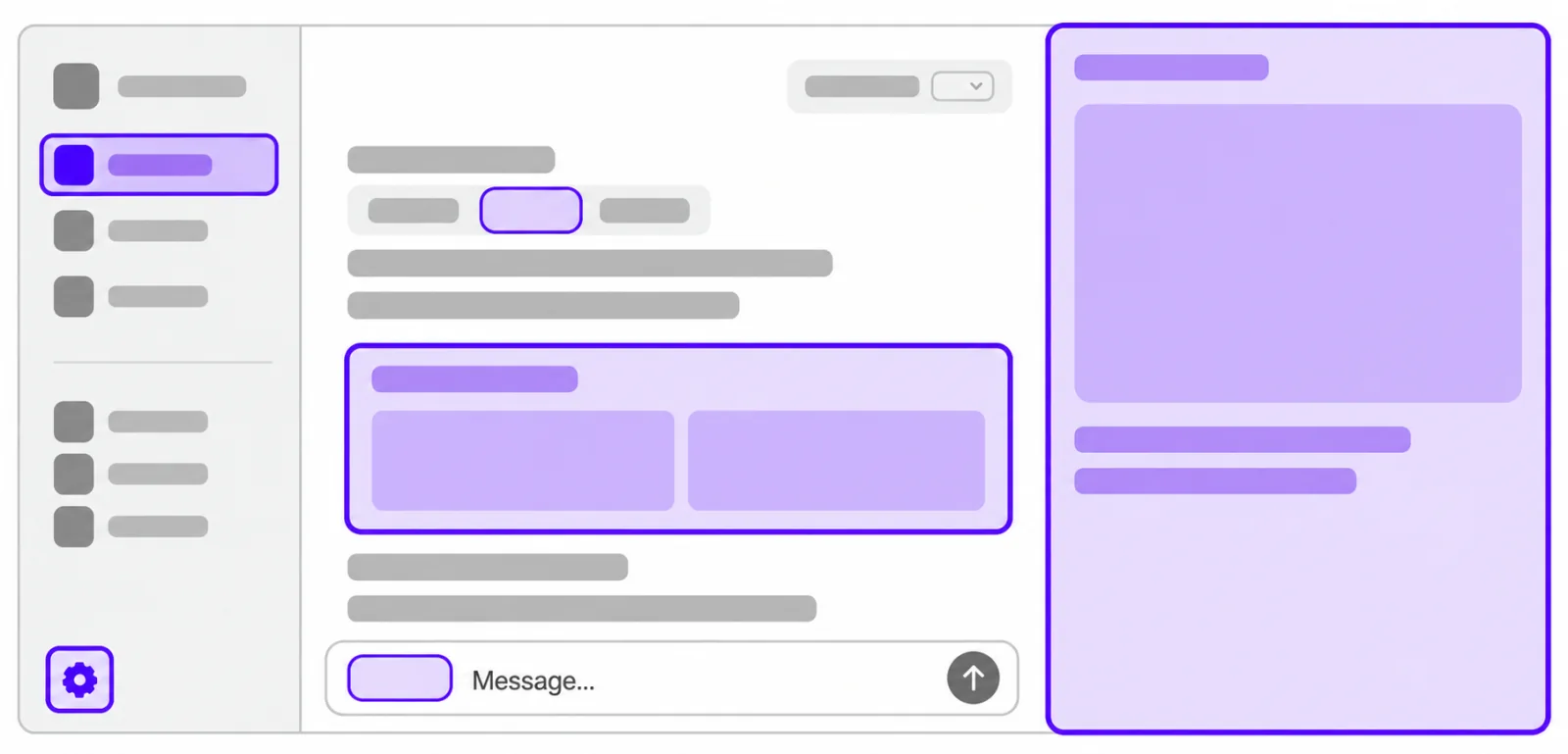
Courtesy: OpenAI, from its Plugin Extensions documentation. This is a product illustration, not a screenshot of this website.
A good extension helps a user inspect or act on the result. A comparison panel could expose the selected records, evidence and filters. A file viewer could preserve the context of an annotation. Design around those concrete interactions before adding more UI surfaces.
20. Plugin submission and discovery
The documented submission process uses a plugin ZIP, automated checks, review and an explicit publication step. Eligible MCP server updates can be picked up automatically after checks, while package metadata, skills or server-configuration changes still require a new ZIP. Submission documentation.
For discovery, describe the task your plugin completes, the information it needs and the artifact it returns. Test the packaged version rather than assuming a locally working server proves that installation and authentication work for a new user.
21. MCP events for automations
MCP Events allows ChatGPT to subscribe to updates such as new messages, comments or status changes. The documented integration uses webhook delivery and verification, requires MCP 2.0 protocol version 2026-07-28, and does not support every delivery mode in the draft specification. MCP Events guide.
This can support a feedback-to-fix workflow: a new report creates an investigation, which produces a reviewed patch. Treat repeated delivery as normal operational behavior. Use persistent subscriptions, authenticated callbacks and idempotent processing so a duplicate event does not create duplicate work.
22. Python and Node SDKs for MCP extensions
The extensions guide links a Python SDK for server-side extensions and a TypeScript SDK for server and app UI integration. The latter is the relevant route for Node projects; the formal specification is language-independent. SDK entry points.
Choose the language your service already uses. The harder work is defining useful tools, stable identifiers, concise outputs and permission boundaries. Keep a small end-to-end example covering authentication, an actual tool result and the corresponding UI before expanding the integration.
23. Plugins and MCP hosting in Sites
Sites is documented as a public-beta platform for creating and hosting websites, apps and games on eligible plans, with usage limits. The broader plugin and MCP hosting item in the supplied roundup was not established by the Sites guide reviewed here. Check a dedicated hosting guide before assuming support for a particular server runtime, transport or deployment contract. Sites documentation.
For a prototype, a hosted interface can shorten the path from idea to a shareable tool. For a durable integration, confirm persistence, secrets, authentication, backups and runtime limits using the hosting product’s actual documentation.
24. ZDR with Private Safety Processing: the enterprise data-control layer
ZDR with Private Safety Processing supports automated safety review using encrypted records in customer-controlled storage. The guide describes a hardware-attested runtime that disables human access and releases bounded safety signals. Records have a documented 30-day TTL in customer storage; this does not mean no content exists anywhere. Eligibility, project configuration and storage responsibilities apply. Private Safety Processing guide.
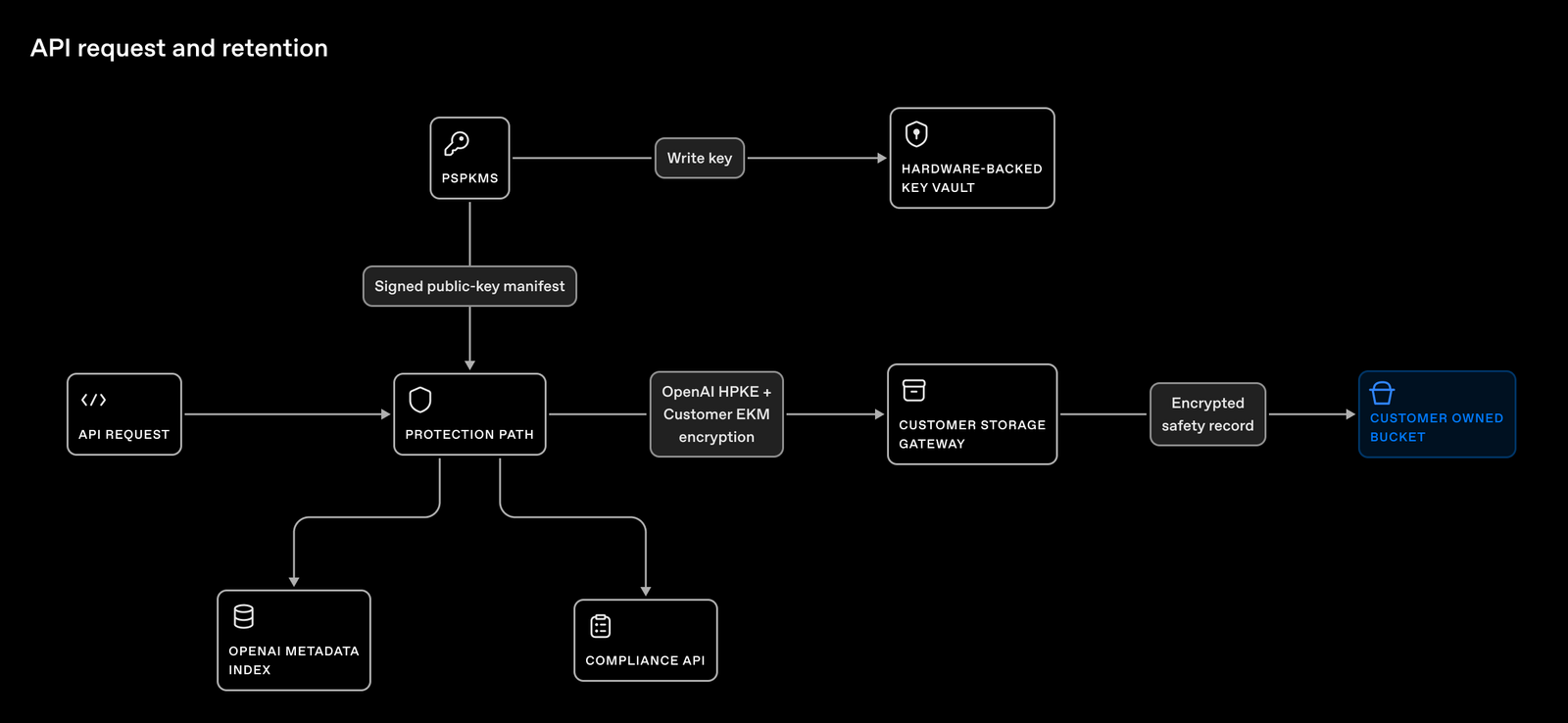
Courtesy: OpenAI, from the Private Safety Processing documentation.
For an enterprise architecture review, map the storage owner, encryption authority, expiration behavior and outputs separately. Product-level data controls do not automatically govern files, logs or downstream tools that your application creates.
How the pieces could work together
The following is an illustrative engineering workflow, not a claim that installing these products automatically connects them:
Imagine a customer reports that filtering a model directory produces no results. The agent needs the expected search, relevant records and code path. It should reproduce the mismatch, propose a focused fix and show a check that fails before the change and passes afterward. The shared Page holds the accepted requirement; the cloud environment supplies dependencies; the review examines the patch; the event integration starts the next investigation when new feedback arrives.
This is why the agent harness and environment deserve attention alongside model selection. The useful outcome is a verified behavior change with a traceable reason.
A practical adoption plan for developers
| First experiment | What to measure | Expand when |
|---|---|---|
| One agent task in a reproducible environment | Setup failures, completion rate, corrections | The task reliably passes your checks |
| One shared Page for a release | Conflicting requirements and missing decisions | People use it as the current reference |
| Sol versus your current setting | Finished-task cost and quality | Quality holds across representative tasks |
| Ultrafast on a latency-sensitive workflow | End-to-end waiting time and cost | The time saved has real value |
| One event-driven automation | Duplicate work, missed events, useful results | Delivery and recovery are dependable |
| One security scan | Validated findings and remediation effort | The threat model matches the application |
Start small enough to understand failure. Save the inputs, accepted requirements and checks for each experiment. Review failures before adding more parallel agents or granting broader access. When comparing products, use the coding-agent directory to identify the surface you need and the model comparator to organize model trade-offs.
Frequently asked questions
Was every listed feature launched at September DevDay?
That attribution was not independently established by the sources reviewed. This article covers the supplied roundup against current official documentation and flags items whose exact details remain unverified.
Is GPT-6.1 Sol the same as Astra Ultrafast?
No. Sol is a model choice; Ultrafast is a service tier. The model guide lists Sol’s launch modes, while the Ultrafast guide describes Astra support. Consult those guides for your account and surface.
Does signing in with ChatGPT give a third-party app my conversations?
The documented plan-usage capability does not grant access to your ChatGPT conversations or other account context. Review the scopes and the app’s own data handling before authorizing it.
Should a small team adopt all these features?
Choose one workflow with a clear success condition. Add the features that help that workflow, measure the result, and expand from evidence. Maintaining unused integrations is work too.
What should I improve before switching models?
Make the task reproducible, keep requirements current, provide bounded source context and define verification. Then compare models on the same finished task. Our JevGrep review explores one way to improve repository discovery before an agent starts editing.
Editorial note: workflow recommendations are the author’s analysis. Product descriptions link to official documentation. Rollouts, preview status, prices and limits can change after the review date.
Keep reading
Related reading
⚡ AI Engineering Briefing
AI model releases, practical tutorials, developer tools, and engineering research. Unsubscribe anytime.
Comments
Comments are temporarily unavailable while the public discussion space is being configured.