Run Any Hugging Face GGUF in Ollama: Setup Guide
>Run any GGUF model directly from the Hugging Face Hub using Ollama. Learn direct URI pulling, custom quantization, Modelfile builds, and private repo auth.
🎧 Listen — ~8 min
Audio summary not available yet

Direct execution of Hugging Face Hub GGUF checkpoints in Ollama
Engineers running local inference pipelines no longer need to manually download multi-gigabyte binary files, handcraft local runtime definitions, and manage split quantizations by hand. Through native integration between Ollama and Hugging Face Hub, developers can run public and private GGUF models directly using remote repository paths.
1ollama run hf.co/bartowski/Llama-3.2-1B-Instruct-GGUFKey takeaways
- Zero-Modelfile execution: Ollama streams and caches GGUF weights directly from Hugging Face Hub URLs using
hf.co/username/repositoryorhuggingface.co/username/repositorynotation without requiring a manualModelfile. - Checkpoint availability: The workflow opens immediate access to over 45K public GGUF checkpoints on the Hub.
- Quantization selection: Ollama defaults to the
Q4_K_Mquantization scheme when present in the repository, with explicit tags available to pull alternate quantization levels likeQ8_0orQ5_K_M. - Private repository support: Private enterprise checkpoints pull securely by configuring Hugging Face user access tokens inside local application settings or CLI environment variables.
- Agentic integration: Downloaded models register directly in Ollama's local engine, exposing standard REST and OpenAI-compatible API endpoints for local orchestration and coding workflows.
Developers evaluating local hardware requirements can consult our AI model directory and test target parameters using the local-fit tool before pulling massive checkpoints.
1. Running models with direct Hub references
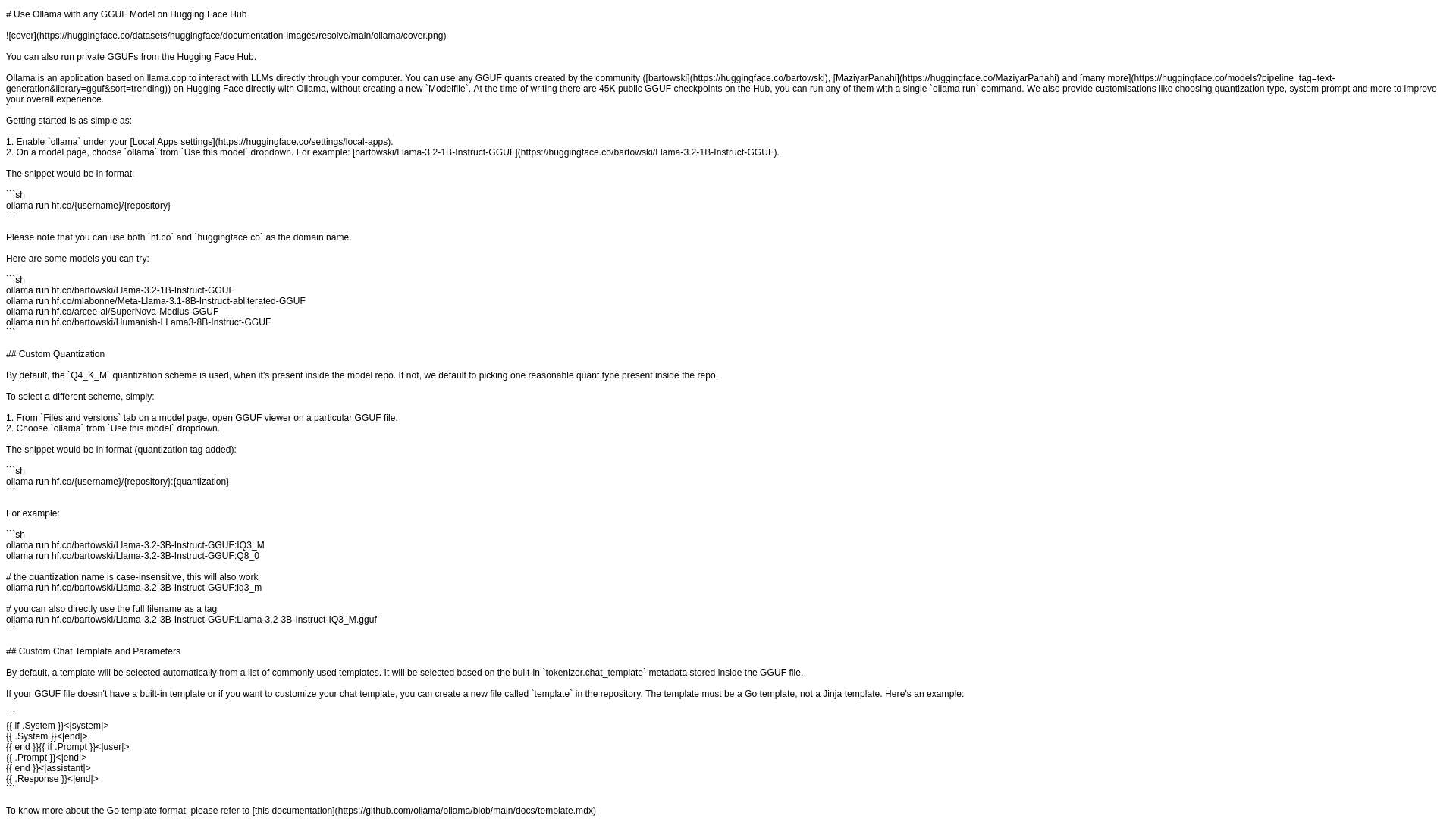
To launch any model directly, enable Ollama under your account settings on the Hub as detailed in the Hugging Face Hub Ollama guide. Once enabled, any model repository containing GGUF artifacts presents an Ollama command option in the Use this model dropdown.
You can run popular community quants, such as those provided by community quantizers like bartowski or MaziyarPanahi, by passing their repository path directly to the ollama run command:
1ollama run hf.co/bartowski/Llama-3.2-1B-Instruct-GGUFThe runtime verifies local cache contents. If the model is not present locally, Ollama downloads the layers while streaming download progress to your terminal. Once download completes, Ollama initializes an interactive prompt session immediately.
For developers building headless applications or background microservices, use ollama pull to pre-stage weights during container initialization or deployment:
1ollama pull hf.co/bartowski/Llama-3.2-1B-Instruct-GGUFThis direct workflow is valuable when setting up localized testing environments or hardening internal developer tooling alongside platforms like open-source AI tooling in VS Code.
2. Selecting custom quantization levels
By default, the Hub integration resolves to the Q4_K_M quantization scheme when it is present inside the target model repository, as outlined in the Hugging Face Hub Ollama specification. If Q4_K_M is absent, the Hub defaults to picking another reasonable quant type found within the repository.
When higher parameter fidelity or aggressive memory reduction is required, you can specify an exact quantization scheme by appending the quant label as a tag:
1ollama run hf.co/bartowski/Llama-3.2-1B-Instruct-GGUF:Q8_0
2ollama run hf.co/bartowski/Llama-3.2-1B-Instruct-GGUF:Q3_K_M
To confirm available quantization files before pulling, navigate to the Files and versions tab on any Hub model page. The embedded GGUF viewer details the exact filenames and quant tags available in that repository.
| Quantization Scheme | Memory Footprint | Relative Quality Retention | Primary Recommended Use Case |
|---|---|---|---|
Q4_K_M | Medium | Balanced baseline | General deployment; default fallback per Hugging Face docs |
Q5_K_M | Medium-High | Elevated fidelity | Complex instruction following and code generation |
Q8_0 | High | Near-lossless weights | Precision auditing and benchmark validation |
Q3_K_M | Low | Moderate degradation | Edge hardware and resource-constrained environments |
IQ2_M / IQ2_XXS | Ultra-Low | Noticeable degradation | Extreme VRAM limits and preliminary prototyping |
Selecting the right scheme requires balancing compute resources against model size. For deeper exploration of weight distributions and memory envelopes, review our tutorial on open-weight LLM licensing and VRAM sizing.
3. Manual GGUF imports with custom Modelfiles
While direct Hub streaming handles standard configurations seamlessly, advanced production scenarios often demand custom parameter controls, modified stopping tokens, or local fine-tune imports. As detailed in WebCraft's GGUF Ollama guide, developers can download standalone GGUF files and register them into Ollama using a custom Modelfile.
Downloading standalone weights
Download the specific GGUF file from Hugging Face using the standard huggingface-cli or curl:
1huggingface-cli download bartowski/Llama-3.2-1B-Instruct-GGUF \
2  Llama-3.2-1B-Instruct-Q4_K_M.gguf \
3  --local-dir ./models \
4  --local-dir-use-symlinks False
Authoring the Modelfile
Create a file named Modelfile in your working directory. Use the FROM instruction to point to the local file path, and add parameters such as temperature, context window size (num_ctx), or custom system instructions:
1FROM ./models/Llama-3.2-1B-Instruct-Q4_K_M.gguf
2PARAMETER temperature 0.2
3PARAMETER top_p 0.95
4PARAMETER num_ctx 8192
5SYSTEM """
6You are a specialized code-review agent. Inspect incoming code submissions for memory leaks, concurrency violations, and improper input handling. Provide concise remediation snippets.
7"""
Compiling and registering the local model
Build the model container in Ollama using the CLI, as outlined in WebCraft's Modelfile guide:
1ollama create local-code-reviewer:v1 -f ./Modelfile
2ollama list
3ollama run local-code-reviewer:v1
This manual approach remains indispensable when defining hard boundaries for internal teams or configuring specialized system directives.
4. Running private GGUF repositories and authentication
Enterprise teams frequently host proprietary fine-tunes and domain-adapted checkpoints in private Hugging Face repositories. According to the Hugging Face documentation on Ollama, Ollama supports running private GGUFs when authenticated against the Hugging Face Hub.
Authenticating via Hugging Face settings
- Navigate to your Hugging Face Settings -> Access Tokens and generate a token with
readpermissions. - Enable Ollama in your Hugging Face Local Apps settings to authorize local invocation.
- Configure your local environment by exporting the token so Ollama's background engine or CLI can access restricted endpoints:
1export HF_TOKEN="hf_your_actual_read_token_here"Once authenticated, pulling from a private organization or personal private repository uses the identical URI syntax:
1ollama run hf.co/your-organization/internal-service-model-ggufIf the auth token is invalid or omitted, Ollama returns an unauthorized HTTP error during the initial manifest discovery phase, halting execution before any weights are fetched.
5. Failure modes, security considerations, and edge limits
Deploying arbitrary GGUF weights introduces operational failure modes that engineering teams must guard against.
Failure modes and remediation
- Truncated or Corrupted Layer Caches: If network transfers interrupt large multi-file downloads, Ollama may fail with EOF or decompression errors during tensor loading. Clear the cached layers using
ollama rm <model-name>and pull the model fresh. - Context Window Memory Spikes: While GGUF models support high context limits, allocating excessive context (
num_ctx 32768or higher) without adequate VRAM causes fallback to system RAM, drastically degrading tokens-per-second throughput. - Malformed Chat Templates: Custom quantizations that omit template metadata in the GGUF header may cause models to output raw role tags (such as
<|im_start|>) into user responses. Resolve this by wrapping the model in a customModelfilewith an explicitTEMPLATEblock as detailed in Tecnobits' complete guide to importing GGUF models.
Security boundaries and parameter isolation
Loading open-weight GGUFs requires strict security isolation. Never treat system prompts, delimiters, or input sanitizers inside model definitions as dependable security boundaries against prompt injection. Unvalidated text inputs can override instructions regardless of prompt framing.
Enforce least privilege outside the inference engine:
- Bind Ollama to localhost (
127.0.0.1:11434) unless behind an authenticated reverse proxy. - When enabling tool-calling models for agentic workflows, enforce schema parameter validation and user confirmation gates in application logic rather than trusting model outputs directly.
- Restrict file system and network access for any host process executing Ollama API requests.
6. Verification checklist
Before rolling out an imported GGUF checkpoint to developers or integration pipelines, verify your deployment: Source
- Quantization Verification: Confirm that the pulled model variant matches your hardware budget by querying
ollama show --modelfile hf.co/bartowski/Llama-3.2-1B-Instruct-GGUF. - API Endpoint Response: Verify the local HTTP endpoint returns valid responses:
bash
1curl http://localhost:11434/api/generate -d '{ 2 "model": "hf.co/bartowski/Llama-3.2-1B-Instruct-GGUF", 3 "prompt": "Respond with: ok", 4 "stream": false 5}' - Context Window Allocation: Ensure inference latency remains within acceptable thresholds by testing with maximum expected payload lengths.
- Auth Token Expiration: For private Hub repositories, confirm automated service environments use non-expiring machine tokens with read-only scopes.
Source website screenshots
Frequently asked questions
Can I run GGUF models that are split into multiple parts on Hugging Face?
Yes. Ollama natively parses Hub repository manifests and downloads split GGUF shards (such as model-00001-of-00003.gguf) automatically, assembling the tensors in local cache without manual merging steps.
Where does Ollama store downloaded Hugging Face models?
Ollama stores downloaded weights in its default local manifests and blobs directory (typically ~/.ollama/models on Linux/macOS and %USERPROFILE%\.ollama\models on Windows). Checkpoints pulled via hf.co URIs are managed alongside standard library models.
Does pulling from hf.co use more bandwidth than the standard Ollama library?
No. Ollama downloads only the specific quantization file selected (or the default Q4_K_M layer) rather than the entire Git repository, keeping bandwidth usage identical to downloading the standalone GGUF file directly.
How do I update a model when the Hugging Face repository releases a new revision?
Run ollama pull <model-uri> to check the remote repository manifest for changes. If the remote checkpoint hash has updated, Ollama downloads the revised layers and updates its local reference.
Sources and image references
- Hugging Face Hub Documentation: Use Ollama with any GGUF Model on Hugging Face Hub
- Tecnobits: Importing GGUF models into Ollama: Step-by-step tutorial
- WebCraft: How to Run a GGUF Model from Hugging Face in Ollama
- Image reference:
https://huggingface.co/datasets/huggingface/documentation-images/resolve/main/ollama/cover.png- Cover illustration of the Ollama Hub integration. Courtesy of Hugging Face; hosted on huggingface.co datasets.
Keep reading
Related reading
⚡ AI Engineering Briefing
AI model releases, practical tutorials, developer tools, and engineering research. Unsubscribe anytime.
Comments
Comments are temporarily unavailable while the public discussion space is being configured.