SaaS Support Triage Copilot Stack
> Build a human-approved support triage copilot with structured outputs, prompt caching, Supabase audit logs, and OpenTelemetry.
🎧 Listen — ~13 min
Audio summary not available yet
Support teams do not need a chatty general assistant. They need a machine that can turn a messy inbound ticket into a risk-scored draft, a cached policy citation, and a clear human handoff.
This stack is for a senior AI or full-stack engineer at a SaaS company that gets enough support volume to matter, but not enough headcount to throw people at every ticket. The boundary is simple: the model may classify, summarize, and draft. It may not auto-send refunds, close accounts, or publish anything externally without approval. Raw ticket text also stays out of long-term memory unless the business has a documented retention reason.
Recommended stack
| Layer | Recommendation |
|---|---|
| Model roles | gpt-5.6-luna for ticket classification and extraction, gpt-5.6-terra for summaries and policy grounding, gpt-5.6-sol for final draft review, human approval for risky actions |
| Agent/interface | Responses API first; use Agents SDK only if you need multi-specialist handoffs, resumable approval flows, or a managed agent loop |
| Skills | openai-docs, supabase-postgres-best-practices, optional next-best-practices for the dashboard layer |
| Plugins | Slack for approval queues, Google Drive or Notion for policy docs, Gmail or Outlook only if the escalation path is email-first |
| MCP/tool categories | Read-only Postgres, GitHub, browser QA, docs search, Slack approval queue |
| Memory pattern | Store policy version hash, ticket summary, verdict, reviewer note, and trace IDs; do not retain raw ticket bodies in durable memory |
| Approval rule | Auto-draft is allowed; auto-send is forbidden until the evaluation harness says the route is safe |
If you want the broader agent-stack mental model behind this, the companion post AI Agent Stacks: Skills, Plugins, MCP, ACP, Memory and Workflows is the right foundation. This article is the micro-niche version: one workflow, one approval boundary, one audit trail.
Why this niche is worth solving
A support queue is a perfect stress test for AI architecture because the work is repetitive, messy, and risky at the same time. Most tickets are boring in exactly the way you want a machine to handle: login issues, billing confusion, missing fields, account metadata, and status questions. But the same queue also contains edge cases where a confident wrong answer is expensive: refunds, contract language, security incidents, legal requests, and privacy requests.
That combination changes the stack choice. You do not want one giant model that reads the inbox, writes the reply, and sends it. You want a bounded pipeline:
- Normalize the ticket.
- Classify risk and intent.
- Retrieve the right policy and product context.
- Draft a reply with a structured contract.
- Escalate anything sensitive.
- Log the decision for audit and review.
That is a more honest architecture than a generic “AI support chatbot.” It is also easier to evaluate because each stage has a measurable failure mode.
Stack selection
The most important decision is not which model is smartest. It is which model does the cheapest correct job at each step.
OpenAI’s latest model guidance now recommends the GPT-5.6 family for new work, with gpt-5.6-sol for flagship capability, gpt-5.6-terra for better cost balance, and gpt-5.6-luna for efficient high-volume tasks. For a support triage system, that maps cleanly to three roles:
gpt-5.6-lunahandles the first pass. It is the routing model: intent, language, severity, refund risk, and whether the ticket should even reach a writer.gpt-5.6-terrahandles dense but bounded work: summarizing a long thread, combining policy snippets, or rewriting the customer history into a compact case note.gpt-5.6-solhandles the hard pass: final draft review, ambiguous edge cases, and tickets where a single wrong phrase has legal or financial consequences.
The interface choice is just as important. The Agents SDK docs say to use the Responses API when you want direct control over model interactions, output items, tools, state, and orchestration. Use the Agents SDK when you want the runtime to manage the loop, resumable approvals, and multi-agent handoffs for you.
For this workflow, Responses API is the better default. The pipeline is bounded, the approvals are explicit, and you do not need a heavyweight multi-agent runtime until the product proves it.
Ecosystem integration
The support copilot does not live inside a model. It lives inside a product stack.
The cleanest integration pattern is:
- Next.js for the internal dashboard and review queue.
- Supabase for case storage, policy tables, RLS, and audit logs.
- OpenTelemetry for traces and token accounting.
- Slack or email for human approval.
- A read-only policy retrieval layer, ideally backed by Postgres or a docs index.
The current OpenAI docs are explicit that Structured Outputs should be used when you need schema adherence, and prompt caching should be used when you have repetitive system instructions or policy packs. Those two features are what make support triage feel like an operational system instead of a probabilistic demo.
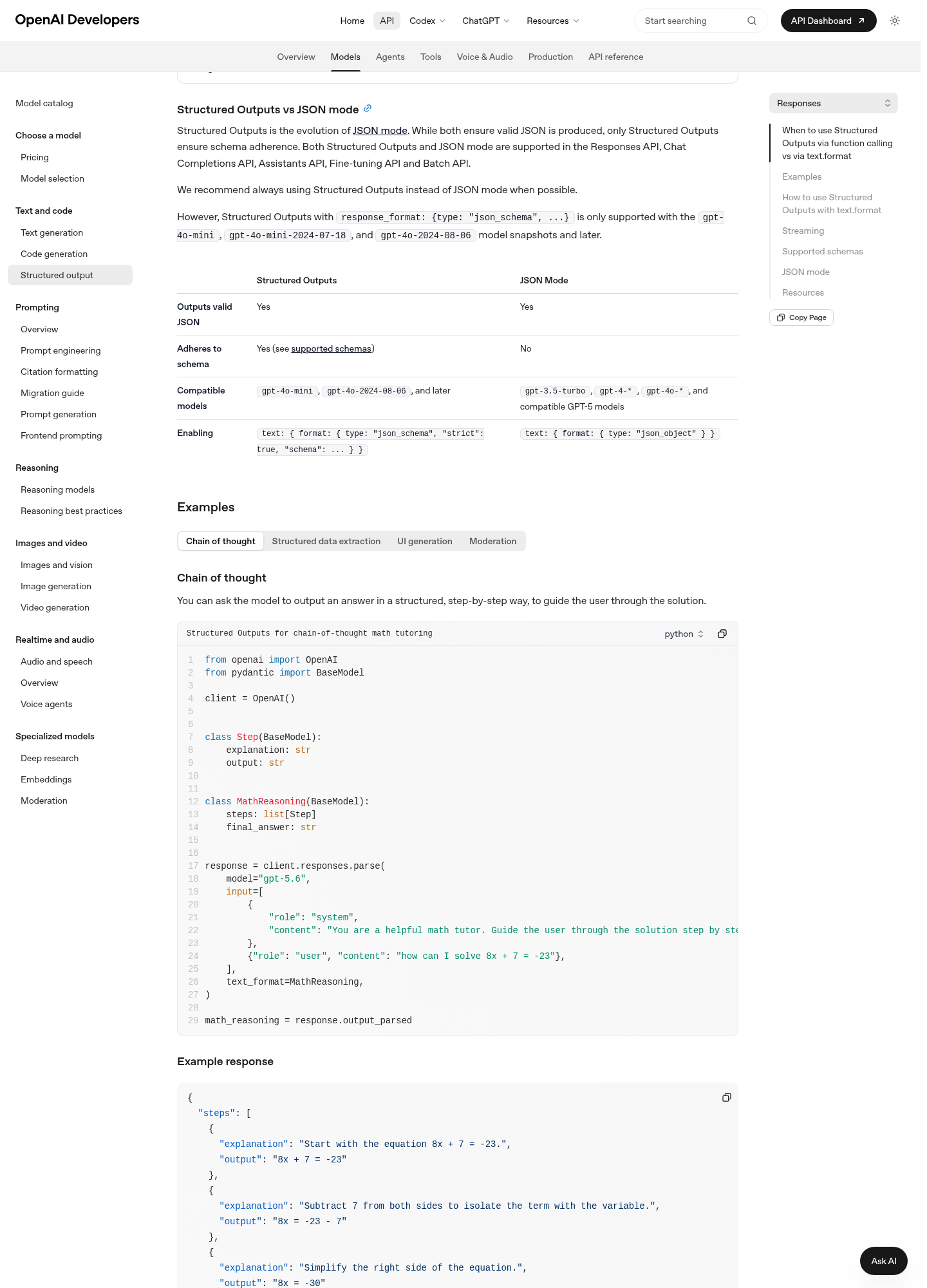
https://essamamdani.com/blog/saas-support-triage-copilot-stack.
Use the screenshot as a reminder of the core contract: the model must return a shape you can trust. If the response cannot be parsed, the case is not “basically fine.” It is a failure that needs fallback handling.
Tool and plugin boundaries
Keep tool access boring and narrow:
- Slack plugin or Slack MCP for approval requests, reviewer comments, and escalation pings.
- Google Drive or Notion plugin only if policy docs and macros already live there.
- GitHub MCP for code review, prompt versioning, and rollout notes.
- Browser MCP or Playwright for UI QA on the review queue, not for production actions.
- Read-only Postgres MCP for policy retrieval and analytics, not for write access.
If your team is building the system with an agentic coding assistant, the only skills that materially help are openai-docs for current API behavior and supabase-postgres-best-practices for schema and RLS design. Everything else is optional unless it solves a specific build bottleneck.
Memory pattern
The right memory strategy is not “remember everything.” It is “remember what matters and nothing else.”
Store these items:
- policy version hash;
- ticket summary after redaction;
- decision class and confidence;
- reviewer note;
- who approved the outbound response;
- trace and run identifiers.
Do not store these items in durable memory:
- raw ticket bodies;
- passwords, tokens, or session links;
- payment details;
- unredacted attachments;
- transient tool traces that contain PII.
That rule matters because support systems quickly become a shadow CRM. If you let the model retain too much, your privacy boundary disappears one ticket at a time.
Original flow diagram
The architecture below is deliberately simple: classify first, retrieve policy second, draft third, send only after approval.

https://essamamdani.com/blog/saas-support-triage-copilot-stack.
Build it
The fastest path is a small, boring codebase with clear file boundaries. Something like this is enough to ship a real pilot:
1src/
2  app/
3    support/
4      page.tsx
5    api/
6      triage/
7        route.ts
8      approve/
9        route.ts
10  components/
11    triage/
12      TicketCard.tsx
13      ReviewDrawer.tsx
14  lib/
15    support/
16      schema.ts
17      prompts.ts
18      policy-loader.ts
19      cache-key.ts
20      safety.ts
21supabase/
22  migrations/
23    20260728_support_triage.sql
The model layer should be structured around one idea: the first pass classifies, the second pass explains. The first pass should be cheap and deterministic. The second pass should be constrained by a schema and a policy pack.
1import OpenAI from "openai";
2import { z } from "zod";
3import { zodTextFormat } from "openai/helpers/zod";
4
5const TriageDecision = z.object({
6  severity: z.enum(["low", "medium", "high", "urgent"]),
7  action: z.enum([
8    "draft_reply",
9    "ask_clarifying_question",
10    "escalate_human",
11    "refund_review",
12  ]),
13  confidence: z.number().min(0).max(1),
14  summary: z.string(),
15  reasons: z.array(z.string()).max(5),
16  pii_detected: z.boolean(),
17  safe_to_autoreply: z.boolean(),
18});
19
20export async function classifyTicket(ticketText: string, policyVersion: string) {
21  const client = new OpenAI({ apiKey: process.env.OPENAI_API_KEY });
22
23  return client.responses.parse({
24    model: "gpt-5.6-luna",
25    input: [
26      {
27        role: "system",
28        content:
29          "You triage SaaS support tickets. Follow the policy pack exactly. Never send a customer reply.",
30      },
31      { role: "user", content: ticketText },
32    ],
33    text: {
34      format: zodTextFormat(TriageDecision, "triage_decision"),
35    },
36    prompt_cache_key: `support-policy:${policyVersion}`,
37    reasoning: { effort: "low" },
38  });
39}
The important part is not the syntax. It is the routing logic:
- the policy pack stays in a stable prefix;
- the ticket body changes per request;
- the output is schema-checked;
- the model can refuse or escalate explicitly;
- the application, not the model, decides whether to send anything.
Prompt caching is what makes the policy pack cheap enough to reuse all day. OpenAI’s docs say caching works automatically for eligible prompts with 1024 tokens or more, and GPT-5.6-family cache writes are billed at 1.25x the uncached input token rate. That means the right move is to keep static policy text, routing rules, and examples at the top of the prompt, then append the ticket-specific content after that boundary.
For longer policy packs, use explicit cache breakpoints and track cached_tokens and cache_write_tokens. If your policy changes, version the cache key so a stale prefix cannot silently survive a policy update.
Supabase schema and RLS
Supabase is the right place for the case ledger because you need a real audit trail, not a JSON file hidden in app state. Keep the triage case, the review decision, and the outbound draft separate.
1create table support_triage_runs (
2  id uuid primary key default gen_random_uuid(),
3  org_id uuid not null,
4  ticket_id text not null,
5  decision jsonb not null,
6  prompt_version text not null,
7  policy_version text not null,
8  created_at timestamptz not null default now()
9);
10
11alter table support_triage_runs enable row level security;
12
13create policy "org members can read triage runs"
14on support_triage_runs
15for select
16to authenticated
17using (org_id = (select auth.jwt() ->> 'org_id')::uuid);
18
19create policy "org members can write triage runs"
20on support_triage_runs
21for insert
22to authenticated
23with check (org_id = (select auth.jwt() ->> 'org_id')::uuid);
The Supabase RLS docs are clear on the important parts: enable RLS on exposed tables, use TO authenticated rather than loose role checks, and remember that UPDATE needs both USING and WITH CHECK. If you expose a dashboard in the browser, keep the service role out of the client and use only the permissions the operator actually needs.
If you build a read-only dashboard view on top of this data, make the view respect the underlying policies. In Postgres 15+, security_invoker = true is the safe default. Do not use a privileged view to “fix” a permission problem.
Operating workflow
The workflow should be easy to explain to a new engineer and easy to audit in a retro.
- Ingest the ticket. Pull text from email, chat, or the helpdesk API. Strip HTML, scripts, and noisy markup. Treat attachments as untrusted until proven otherwise.
- Redact before model use. Remove secrets, payment data, and anything that does not need to be in the prompt.
- Classify with the fast model. Use
gpt-5.6-lunawith low reasoning and a narrow schema. - Route by risk. If the ticket touches money, legal language, security, account deletion, or privacy requests, force human review.
- Retrieve policy. Pull the latest policy pack and product notes from read-only storage. This is where RAG belongs, not in the first-pass classifier.
- Draft with the reviewer model. Use
gpt-5.6-solorgpt-5.6-terradepending on complexity. - Show a human the exact draft and the reasons. Slack, email, or the internal dashboard are all fine as long as the approver can see the model’s confidence and policy basis.
- Only then send. The send step is a separate tool with a separate permission boundary.
- Log the run. Persist the verdict, policy version, reviewer note, and trace ID in Supabase.
Default posture: auto-draft, never auto-send. The route only becomes fully automated after the evaluation set proves that the risk is genuinely low.
That sequence sounds cautious because it is. Support systems are where “mostly right” can still be unacceptable.
Failure modes
The main failure modes are predictable once you stop pretending the model is a person.
- Prompt injection through ticket content. A customer can paste hostile instructions into the body or attachment. Treat all inbound content as data, not instructions.
- Stale policy prefixes. If you cache a policy pack too aggressively and then change the policy, you can accidentally preserve the old behavior.
- Overconfident routing. A low-risk classifier that misses a refund or privacy ticket is worse than one that escalates too often.
- Schema drift. If the output contract changes without updating the validator, the app will break in production or, worse, accept malformed data.
- Tool overreach. Never give the classifier write access. Never let the reviewer send email directly. The send step should be a separate service.
- Memory pollution. Storing raw ticket bodies in durable memory creates privacy debt and compliance risk.
- Dashboard auth mistakes. A public table without RLS is a leak waiting to happen.
OpenAI’s structured-output guarantees help with the schema problem, but they do not solve prompt injection or bad policy design. OWASP’s LLM Top 10 still puts prompt injection at the top for a reason: the model will happily follow malicious text unless your application boundaries are strict.
Evaluation
You need an evaluation harness before you let this system touch real customers.
Use a golden set of 100 to 500 historical tickets, grouped by:
- safe FAQ;
- billing ambiguity;
- refund request;
- account deletion;
- security issue;
- legal/privacy request;
- angry but harmless complaint;
- multilingual support message.
Measure these metrics:
| Metric | What good looks like |
|---|---|
| First-pass schema validity | Near 100 percent |
| Safe-ticket auto-draft rate | High enough to matter, but only on low-risk cases |
| High-risk recall | No missed refund, privacy, or legal cases |
| Human override rate | Falling over time, not rising |
| Cache hit rate | High on the static policy prefix |
| Time to first draft | Low enough that agents feel the improvement |
| Cost per resolved ticket | Lower than the current manual baseline |
| Hallucinated policy citations | Zero tolerated in production |
If the model looks good only when the policy pack is tiny, that is not a win. It means your prompt architecture is underfit. If the model looks good only after three retries, the system is too fragile. The goal is a clean first or second pass, not a heroic third pass.
When to use the Agents SDK instead
The Responses API should be enough for the first version. Switch to the Agents SDK only if one of these becomes true:
- you need a separate policy specialist, summary specialist, and reply specialist;
- you want resumable approvals without hand-rolling state management;
- you need the runtime to manage tool loops and branching for you;
- the support workflow becomes more like a case-management system than a single model call.
Until then, keep the surface area small. Small surfaces are easier to test, easier to secure, and easier to explain in a postmortem.
FAQ
Why not just use one large model for everything?
Because the cheapest correct step is usually not the same as the strongest model. Classification, summarization, and final review are different tasks with different error costs. Routing them separately is cheaper and safer.
Why use prompt caching at all?
Support systems reuse the same policy pack, safe-response language, and routing rules for every ticket. Prompt caching keeps that stable prefix from being recomputed every time, which lowers latency and cost for the repetitive part of the prompt.
Why not let the model send the reply directly?
Because support is a liability surface. Refunds, account changes, legal language, and privacy requests deserve a human gate until the evaluation data says otherwise.
What should be stored in long-term memory?
Only durable facts: policy version, final decision, reviewer note, timestamps, and trace IDs. Never store raw ticket text unless your retention policy explicitly requires it.
When is RAG worth adding?
Use RAG when the answer depends on a changing policy, product docs, or account-specific context. Do not use it to compensate for a weak classifier or to give the model more excuses to wander.
Sources
- OpenAI: Structured Outputs
- OpenAI: Prompt caching
- OpenAI: Agents SDK
- OpenAI: Using GPT-5.6
- Supabase: Row Level Security
- OpenTelemetry: GenAI observability
- OWASP: Top 10 for Large Language Model Applications
Related reading
- Building AI Applications with AI SDKs: A Comprehensive Guide
- Building Powerful RAG Applications with Pinecone, OpenAI, and LangChain
- Setting Up a Robust Supabase Local Development Environment
- Running Multiple Instances of a Single Docker Compose Application
- AI Agent Stacks: Skills, Plugins, MCP, ACP, Memory and Workflows
Keep reading
Related reading
⚡ Daily AI Model Drop — Get Kimi K3 benchmarks before Twitter
Join 2,400+ AI engineers. 1 email/day, no spam, unsubscribe anytime