OpenAI Realtime for Production Voice Agents
> Build browser and server voice agents with OpenAI Realtime, WebRTC, WebSockets, safety identifiers, transcription sessions, and rollout checks.
🎧 Listen — ~10 min
Audio summary not available yet
Method and confidence
This guide separates confirmed facts from engineering judgment.
Confirmed facts come from the current OpenAI API docs for Realtime and audio, WebRTC, WebSocket, Realtime transcription, and Voice agents. I also lean on MDN for the browser-side WebRTC surface when the OpenAI docs point back to standard browser APIs.
My recommendations are the inference layer: where to put the backend, which transport to choose first, what to log, and which failure modes deserve a hard stop. I avoid universal latency claims because the docs do not promise a fixed millisecond budget across geographies, devices, and model settings. Benchmark your own audio, not somebody else’s demo.
The first design choice is transport, not model
The docs are more opinionated than many developers expect. OpenAI now treats realtime work as a session problem with distinct modes:
- voice-agent sessions when the model should converse, call tools, and manage dialogue state
- translation sessions when speech should be translated continuously
- transcription sessions when you want live transcript deltas without a spoken assistant response
The browser/server transport then follows from where audio lives:
- WebRTC for browser and mobile clients that capture or play audio directly
- WebSocket for server-to-server or media-pipeline integrations
- SIP for telephony
That split matters because a lot of “voice agent” architectures are really three different systems pretending to be one: live audio ingestion, stateful conversation control, and downstream tool execution. If you blur them together, debugging becomes a guessing game.
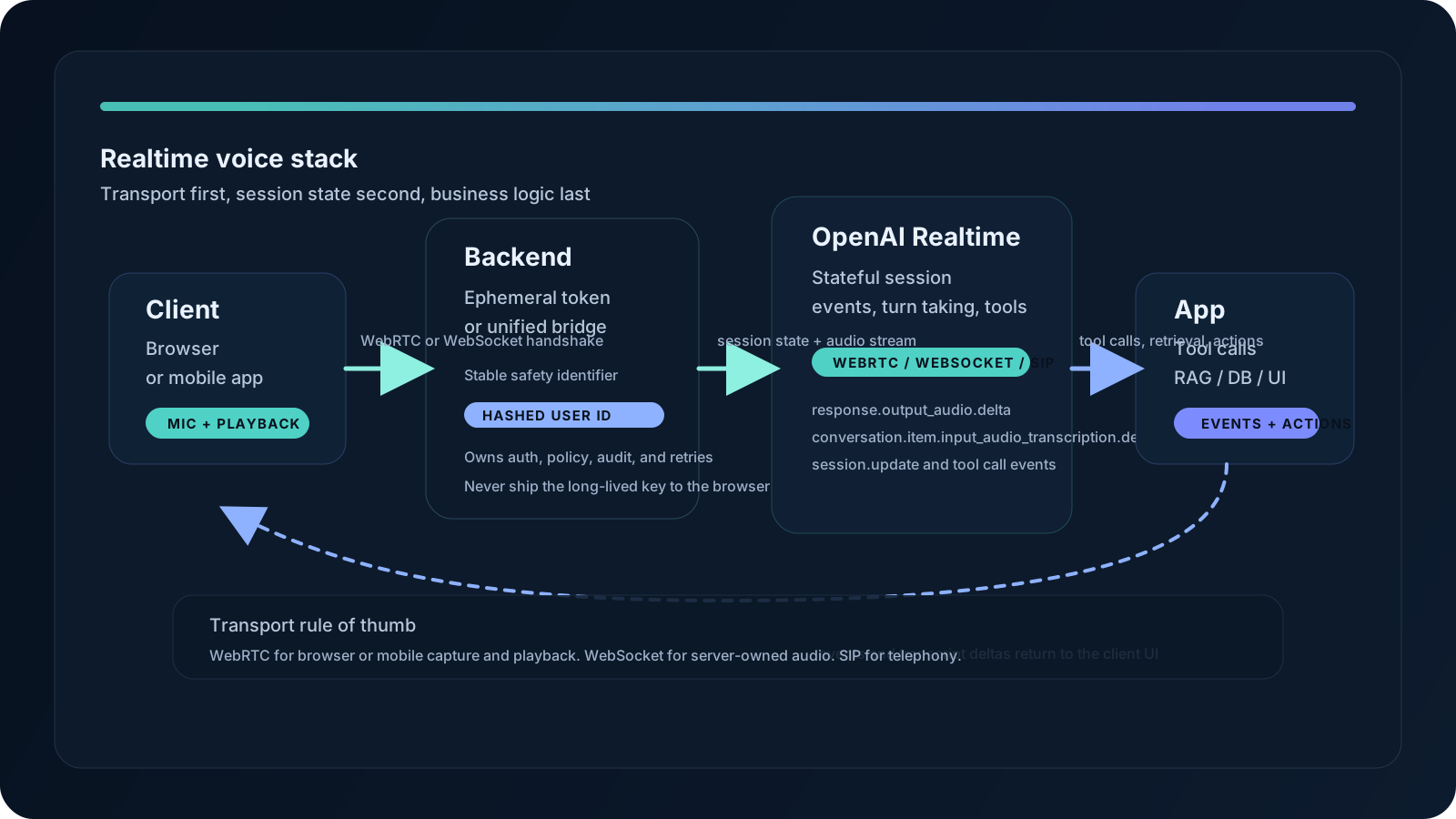
Original diagram by Essa Mamdani. Conceptual architecture only; it is derived from the current OpenAI Realtime docs and standard browser WebRTC patterns.
Use this as the mental model: audio transport is an integration detail, but session state is the product behavior. The backend should own secrets, policy, and audit boundaries. The client should own microphone capture, playback, and user experience.

This screenshot proves the docs’ current decision tree. OpenAI explicitly separates voice-agent, translation, and transcription sessions, then recommends WebRTC for browser or mobile clients and WebSocket for server pipelines. That is not a stylistic preference. It is the actual starting point for a production implementation.
What a realtime session actually is
The important difference from a classic request/response API is that a realtime session is stateful. You open a connection, keep it alive, exchange events, and let the session manage the conversation lifecycle.
OpenAI’s current GA docs describe a voice-agent session as the path where the model responds to the user, calls tools, and manages conversation state. That is the path to start with when your product is trying to feel like a conversation rather than a batch pipeline.
The same docs also point out something easy to miss: realtime reasoning should usually start with reasoning.effort set to low for production voice agents, then be tuned only if latency tolerance and task complexity justify it. That is a good default because voice systems punish hesitation more than most text apps do. Users notice silence immediately.
The session lifecycle also has a privacy implication. OpenAI recommends a stable, privacy-preserving OpenAI-Safety-Identifier for requests. In practice, that should be a hashed internal user ID created by your trusted backend, not a browser-visible value, because the identifier is there to let the platform correlate abuse across sessions without exposing your customer data.
If you already run structured tool pipelines, pair this stack with OpenTelemetry GenAI observability so you can trace the audio session, tool calls, and downstream service hops without dumping raw prompts everywhere. For broader agent wiring, the AI agent stacks guide is the right companion. For threat boundaries around tool servers, see the MCP threat-modeling guide.
WebRTC is the browser default for a reason
If the user speaks in a browser or on a mobile device, OpenAI recommends WebRTC instead of WebSockets. That is not just about hype; it is about who owns the audio loop.
With WebRTC:
- the browser captures microphone input
- the browser plays model audio directly
- a data channel carries non-audio session events
- your backend can mint an ephemeral client secret or broker the unified interface
That shape is a better fit for interactive UI than a raw socket full of base64 chunks. It also lets the browser work with the native peer-connection stack instead of reinventing transport details in application code.
Here is the smallest pattern worth trusting in production: your backend creates the session credential, your browser opens a RTCPeerConnection, the microphone track goes into the peer connection, and a data channel carries session events.
1// browser.ts
2const pc = new RTCPeerConnection();
3
4const audioEl = document.createElement('audio');
5audioEl.autoplay = true;
6pc.ontrack = (event) => {
7  audioEl.srcObject = event.streams[0];
8};
9
10const mic = await navigator.mediaDevices.getUserMedia({ audio: true });
11pc.addTrack(mic.getTracks()[0]);
12
13const events = pc.createDataChannel('oai-events');
14events.addEventListener('message', (event) => {
15  const message = JSON.parse(event.data);
16  console.log(message);
17});
18
19const offer = await pc.createOffer();
20await pc.setLocalDescription(offer);
21
22const answerResponse = await fetch('/session', {
23  method: 'POST',
24  headers: { 'Content-Type': 'application/sdp' },
25  body: offer.sdp,
26});
27
28await pc.setRemoteDescription({
29  type: 'answer',
30  sdp: await answerResponse.text(),
31});
The corresponding backend endpoint should stay boring:
1// server.ts
2import express from 'express';
3
4const app = express();
5app.use(express.text({ type: ['application/sdp', 'text/plain'] }));
6
7app.post('/session', async (req, res) => {
8  const form = new FormData();
9  form.set('sdp', req.body);
10  form.set('session', JSON.stringify({
11    type: 'realtime',
12    model: 'gpt-realtime-2.1',
13    audio: { output: { voice: 'marin' } },
14  }));
15
16  const response = await fetch('https://api.openai.com/v1/realtime/calls', {
17    method: 'POST',
18    headers: {
19      Authorization: `Bearer ${process.env.OPENAI_API_KEY}`,
20      'OpenAI-Safety-Identifier': 'hashed-user-id',
21    },
22    body: form,
23  });
24
25  res.status(response.status).send(await response.text());
26});
27
28app.listen(3000);
The production lesson is simple: do not put a long-lived API key in the browser, even if the demo works. Use an ephemeral token or a unified server path, and keep the backend in the trust boundary.
WebSocket is the right choice when the server owns audio
The WebSocket guide is intentionally lower level. OpenAI says it is a good choice for server-to-server integrations, especially when your backend already receives raw audio from a media pipeline, call system, or worker.
That means the WebSocket path is best when:
- audio already arrives on the server
- you need maximal control over how chunks are queued and committed
- you are bridging phone systems, ingest workers, or other controlled pipelines
It is also the path where the implementation burden is more visible. You are responsible for serializing events, sending audio chunks, and keeping the state machine aligned with the server. In exchange, you get a straightforward backend integration surface.
1// websocket-client.ts
2import WebSocket from 'ws';
3
4const ws = new WebSocket('wss://api.openai.com/v1/realtime?model=gpt-realtime-2.1', {
5  headers: {
6    Authorization: `Bearer ${process.env.OPENAI_API_KEY}`,
7    'OpenAI-Safety-Identifier': 'hashed-user-id',
8  },
9});
10
11ws.on('open', () => {
12  ws.send(JSON.stringify({
13    type: 'session.update',
14    session: {
15      type: 'realtime',
16      instructions: 'Be concise, warm, and ask one clarifying question at a time.',
17    },
18  }));
19});
20
21ws.on('message', (chunk) => {
22  console.log(JSON.parse(chunk.toString()));
23});
The docs are clear that WebSocket is the lowest-level interface of the three. That is not a criticism. It is an admission that the transport is useful precisely because it stays close to the wire.
Transcription is a different product, not a smaller assistant
Realtime transcription deserves its own design because the user goal is different. In a transcription workflow, the right output is streaming text, not a spoken response.
OpenAI’s transcription guide recommends gpt-realtime-whisper for live audio and transcript deltas, while gpt-4o-transcribe and gpt-4o-mini-transcribe are better fits for file or request-based workflows where streaming is not required. That distinction is useful because it prevents one of the most common mistakes in voice product work: using the wrong model class just because it has “audio” in the name.
If you want live captions, handle the buffer manually or enable server VAD where supported. The docs show the event sequence explicitly:
1ws.send(JSON.stringify({
2  type: 'session.update',
3  session: {
4    type: 'transcription',
5    audio: {
6      input: {
7        format: { type: 'audio/pcm', rate: 24000 },
8        transcription: {
9          model: 'gpt-realtime-whisper',
10          language: 'en',
11        },
12      },
13    },
14  },
15}));
16
17ws.send(JSON.stringify({
18  type: 'input_audio_buffer.append',
19  audio: base64Pcm16,
20}));
21
22ws.send(JSON.stringify({
23  type: 'input_audio_buffer.commit',
24}));
Then listen for conversation.item.input_audio_transcription.delta and conversation.item.input_audio_transcription.completed. That event shape is the reason a transcription session is not the same thing as a voice-agent session. One streams text for a human to read; the other manages a dialogue loop that may trigger tools, turn-taking, and replies.
The major production warning here is latency tuning. OpenAI documents several delay levels, from minimal through xhigh, and explicitly says the exact delay can vary by model configuration. Do not infer a fixed milliseconds-per-setting rule from synthetic samples. Measure with your microphones, accents, vocabulary, and network conditions.
A practical transport comparison
| Choice | Best fit | Strength | Trade-off |
|---|---|---|---|
| WebRTC | Browser or mobile voice apps | Native audio handling, lower-level browser media integration, good for interactive UX | More moving parts in the browser, and the backend still needs a secure session path |
| WebSocket | Server-to-server or media pipelines | Straightforward backend control, easy to integrate with workers and call systems | You manage the audio chunks and the event state machine yourself |
| SIP | Telephony systems | Direct fit for phone infrastructure | Narrower use case; confirm model support before adopting |
My rule of thumb is blunt: if audio starts and ends in the browser, use WebRTC. If audio already lives on your backend, use WebSocket. If the connection is a phone call, look at SIP. Every time I’ve seen teams fight this rule, they ended up implementing extra glue to recover the same decision later.
Production checklist
The docs give you enough to ship, but not enough to ship safely on their own. Use this as the minimum rollout gate:
- Generate ephemeral client secrets on the backend, never in frontend code.
- Set
OpenAI-Safety-Identifieron the trusted server side with a hashed internal user ID. - Start browser voice assistants with WebRTC, not raw WebSocket audio, unless you have a strong reason not to.
- Use WebSocket only when your server already owns the audio pipeline.
- Treat transcription as a separate workflow with its own model, event handling, and UI.
- Test the session with real microphones, background noise, and real turn-taking.
- Capture traces for session setup, model calls, and tool invocations, but keep raw audio and transcripts behind a deliberate privacy policy.
- If your agent uses tools, add timeouts, retry budgets, and a clear cancellation path.
- Keep a fallback route for when the model is silent, the browser blocks mic access, or the user interrupts mid-turn.
This is also the layer where observability and security converge. OpenTelemetry GenAI observability helps you see what happened. Secure AI containers with SBOMs and provenance helps you know what binary and runtime actually shipped. The two together are how you avoid a “works on my machine” voice demo turning into a support incident.
FAQ
Should I start with WebRTC or WebSocket?
Start with WebRTC if the user speaks directly into a browser or mobile app. OpenAI’s docs recommend it for client-side capture and playback. Use WebSocket when the backend already owns audio, such as a media worker or call-processing service.
Do I need an ephemeral token?
If the browser talks to OpenAI directly, yes, you need a safe session-credential flow. The docs show both ephemeral-token and unified-interface approaches. In either case, the browser should not hold a long-lived secret.
What is the OpenAI-Safety-Identifier for?
It is a privacy-preserving stable identifier that helps OpenAI correlate abuse or policy issues without tying requests to a raw customer record. Use a hashed internal user ID on the trusted backend.
Is Realtime transcription the same as voice agents?
No. Voice agents speak and manage turns. Transcription streams text deltas without a spoken assistant response. That separation matters for both product design and model selection.
When should I use gpt-realtime-whisper?
Use it when your product needs live transcription with streaming deltas. For file uploads or bounded transcription jobs, OpenAI points you to the standard speech-to-text path instead.
Should I log raw audio and transcripts?
Only if you have a short-lived, explicit debugging or evaluation policy. Default to metadata-only traces. If you must capture content, redact secrets first and put the content behind strict retention and access controls.
What is the biggest production mistake teams make here?
They collapse transport, conversation state, and business logic into one blob. Once that happens, the backend becomes hard to secure, the frontend becomes hard to debug, and every change feels like a rewrite.
Primary sources
- OpenAI Realtime and audio overview
- OpenAI Realtime with WebRTC
- OpenAI Realtime with WebSocket
- OpenAI Realtime transcription
- OpenAI Voice agents
- MDN WebRTC API
- W3C Trace Context
If you are building a real product, do not stop at the happy path. Wire the session, trace it, redact it, and test it under interruption. That is where voice UX either becomes convincing or falls apart.
Keep reading
Related reading
⚡ Daily AI Model Drop — Get Kimi K3 benchmarks before Twitter
Join 2,400+ AI engineers. 1 email/day, no spam, unsubscribe anytime